• BLOG
  • ABOUT
    • Privacy Policy

Organize Your Family History

Stay focused and happy while exploring your roots

The scanner that comes with your iPhone

September 24, 2019 By Janine Adams Leave a Comment

I recently learned on one of the many terrific Facebook genealogy groups I belong to (I apologize that I don’t remember which one), about a little gem hiding in the iPhone and iPad. I’ve been using an iPhone since I bought a 4S back in 2012 (the same year I started this blog!), but I had never heard about this feature. It’s the scanner feature on the native Notes app.

I don’t use the Notes app much, since I tend to use Evernote to actually keep notes, but I’ve used it off and on over the year. Since I learned about the scanner feature, I’ve using it every time I have a piece of paper I want to capture. I’ve found it easier than using a dedicated scanning app. And it’s handy sometimes that creates a pdf, rather than a jpg.

Here’s how it works:

Let’s say you’re in a library or repository and find a document you want to save.

  1. Open the Notes app on your iPhone or iPad.
  2. Press the icon to create a new note.
  3. Touch the icon that looks like a + sign inside a circle.
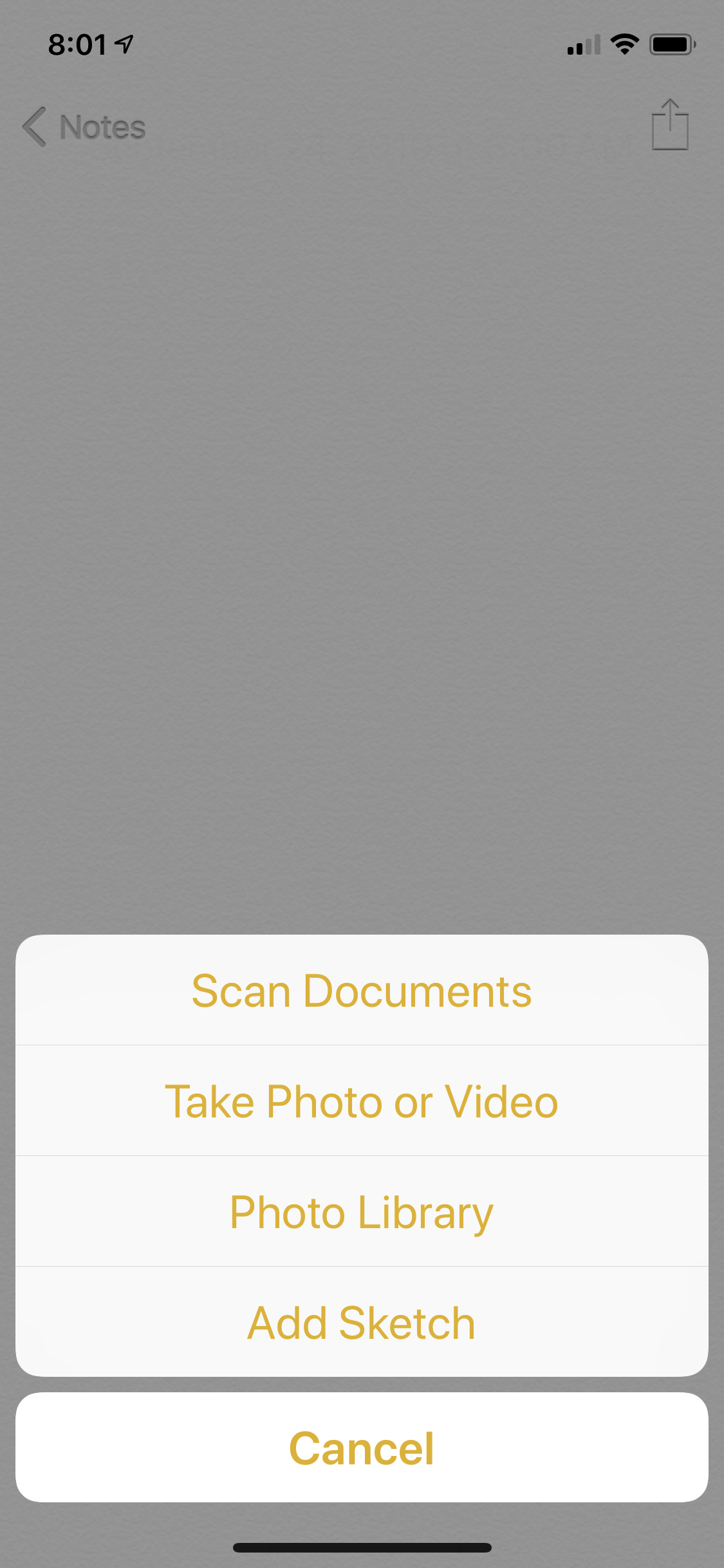
  4. Touch Scan Documents
  5. Position your phone above the document.

The app will try to locate the edges of the document and take the picture automatically. (It’s like my bank’s app when I’m doing a mobile deposit of a check.) If it can’t find the corners quickly, you can press the round shutter-release icon (like on the camera app) and take the picture and then adjust the corners as necessary. For books that aren’t lying flat, that’s more likely to happen.

For pieces of paper, the photo tends to get taken automatically. It’s really fast and easy–it feels like magic.

Once you have the scan, you can press Save, or you can press the little icon of the picture and then retake it. Once you press Save, you can keep it in your Notes app for processing later or use the Share icon to either email it to yourself or save it in Evernote, Dropbox, Google Drive or other apps that might work for you.

On my next research trip, I will give it a try. I think it will save time over just using my phone’s camera, as I did on my Kentucky trip.

One caveat: I understand that in the latest iOS iteration from Apple, the iPad has its own operating system, rather than sharing the iPhone’s. I have not downloaded iOS 13 yet (I like to wait until the kinks are worked out before downloading) and I don’t use an iPad. I’m assuming this feature will exist in the new iOS for the iPhone and the iPad, but I haven’t tried it.
 

Filed Under: Genealogy tips, Technology Tagged With: electronic files, genealogy tools, organizing aids, technology

How accurate is Ancestry?

August 9, 2019 By Janine Adams 46 Comments

When I was at the Kentucky Historical Society research room in June, I overheard a conversation between a librarian and a patron. The patron, who displayed a certain amount of naiveté about genealogy research when he asked the librarian whether there was an index to everything in the library, proudly told the librarian that he’d been researching on Ancestry.com for years. The librarian’s response made me raise my eyebrows. He said, with a disapproving tone of voice, “A lot of stuff is wrong there; you can’t really trust those online sites.” I was so surprised by that statement that I wrote it down.

This felt all kinds of wrong to me for a couple of reasons. One is that, in one sentence, he invalidated this man’s genealogy experience. The other is that it’s just not true. I probably should have spoken up and argued the point, but I was in a library…it didn’t feel the place for a debate.

But it got me thinking about the notion that online sites like Ancestry or Family Search are inaccurate. I think that the librarian was referring to the family trees that can be found on the sites. Sure, trees are only as good as the practices of the genealogist who created them (or, in the case of Family Search, added to them). Many are not accurate. That’s why I ignore them.

Ancestry is typically the first place I go for source documents when I’m doing online research. It has millions of documents that provide evidence to prove facts in my genealogy research. I usually find them via search, either on a person or in the card catalog. I almost never even look at hints. And I carefully evaluate the suggested records that come up when I’ve clicked on a document in a search. (Usually, they are for the person I’m researching and are hugely helpful.)

Ancestry, along with Family Search, are fundamental to growing my research when I’m researching online (and I’m usually researching online). I was shocked to hear this authority figure completely dismiss online sites.

I was recently talking with a genealogy friend about her quest to solve a mystery. It became apparent that she was using online trees (in combination with DNA matches) as a main avenue for trying to solve the mystery. The conflicts among the trees were frustrating her. I suggested she back away from the trees and look for documents that could prove her suppositions. For me, the documents in Ancestry, not the trees, are where the value lies.

Of course, we must evaluate the documents and the evidence found in them. Good genealogists question everything. Is there inaccurate information on Ancestry? Of course–the family trees are full of them. Do the hints or suggested records sometimes apply to the wrong person? Yes!

But to describe Ancestry as inaccurate is, well, inaccurate. Everything you find in any repository (online or otherwise) must be evaluated. If you use Ancestry as tool to find documents that you then analyze, you’re on the path to success, in my opinion. However, if your starting point at Ancestry is looking at family trees, you may find yourself in the weeds.

My annual subscription to Ancestry is up for renewal this month. I always give it some thought and I always renew. I’m fortunate to be able to afford it; if I were looking to economize, though, Ancestry would probably be the last subscription I’d drop.

What about you? Do you think that the online sites get a bad rap? How do you make sure you’re getting good information from them?


Filed Under: Genealogy tips, Reflections, Technology Tagged With: Ancestry, genealogy tools, online research, research, technology

Organizing your family history research with Zotero

February 23, 2019 By Janine Adams 11 Comments

I interviewed the author of this guest post, Donna Cox Baker, in my How They Do It series last year. In it, she mentioned she used Zotero, which I had not been familiar with, to organize her genealogy research. I asked her to write a guest post about Zotero and here it is! I haven’t checked out Zotero yet, but I very much appreciate reading Donna’s perspective as a Zotero power user. For more information, check out Donna’s book, Zotero for Genealogy.

I want to thank Janine for offering me the chance to expand on the wonders of Zotero. It is the core of my genealogical research, as it once was in my doctoral research.
With thousands of resources to cite in my doctoral research, Zotero sold me the minute I experienced the “Zotero Connector” add-on. The connector is an extension for web browsers that allows you to click a single button and extract citation data from any number of places it appears, even Amazon. The citation for virtually anything that appears in a library catalog online can be stored in your Zotero database in less than a second.

Through another extension, Zotero can be linked to Microsoft Word. You can create your footnotes and bibliography straight from Zotero, letting it format the citation.

Discovering Zotero for genealogy

Well, that was graduate school. Within minutes of finishing the dissertation, I had pulled out my long-neglected genealogy box, and got back to the thing that first made me care about history.

Our family tree solutions—like Family Tree Maker, Ancestry.com, Legacy, RootMagic, MyHeritage, and so forth—give us adequate ways to document individual facts. We add a birthdate to an ancestor’s profile and cite the source. But research—what I call Big-R Research—starts way before the individual facts and goes much bigger than an isolated birthdate.

Genealogists have file cabinets full of Big-R Research, if we’re doing true family history, and not just filling in the blanks on a chart. We want to know about where our people lived and how they lived. We want road maps of their communities and the minutes kept at their church’s business meetings. We want photographs and letters and court transcripts that fill in the story. Our research can fill a room.

It doesn’t have to fill a room, though. It can take up gigabytes, instead. But we need a tool to store and retrieve it. My search for a proper Big-R Research tool began.

I tried OneNote, then Evernote, but I continued to feel a nervous sense of distrust. Would the structure hold together? Was it portable to other tools?

Then it hit me. I already had the tool I needed. It was tried and sure. It was both structured and flexible, controlled but expansive. Zotero would be great for genealogy!

Before I get into the reasons it is great, let me be transparent in this: it was not made for genealogy or by genealogists. I’ve developed tweaks here and there to deal with the differences between history and genealogy. You will not dump perfectly formatted Evidence Explained citations from Zotero (or most other tools I’ve tried). But you can come pretty close. And I’m working on some technical tweaks that will get us even closer.

Why Zotero matters

Zotero is great for genealogy for all of these reasons and more:

  • It is free, with the stability and support of a university backing it up. Even if you are syncing to the Zotero cloud, you can do that for years on free storage, before you have to buy some. And when you do buy storage, it’s inexpensive and unlimited.
  • It provides the structure missing from tools like OneNote and EverNote, but brings substantial flexibility, along with the structure.
  • It can add most catalogued online source citations to your Zotero library with one click.
  • It can organize and provide one-click access to the thousands of documents, spreadsheets, photographs, and other files you have saved to your hard drive. In essence, it can draw all those files together into a uniform, organized system. Zotero becomes your door to all you have collected.
  • It allows you to create a record once but to file it in as many folders as you want without taking up significant extra space. You make a change once, and it changes in every folder.
  • You can find things rapidly, even if you only have vague memories of having long ago found a document that might be of use in solving a new genealogical problem.
  • It will sync to the cloud, allowing you to access your work at Zotero.org, wherever you have Wifi access.
  • It can replace your to-do list and your research log with something more efficient and always accessible.
  • It allows you to set up group arrangements, so multiple people can collaborate together on a research collection.
  • It can import from and export to a number of other bibliographic managers or databases, making it portable and survivable in a changing world.
  • And while you are in Zotero every day anyway, why not store personal things there? How about storing recipes, your journal, articles about financial management in retirement. It can be your photo album. It can even store every article coming out of an RSS feed you have subscribed to.

Giving it a try

Since Zotero is free, you can try it with no risk. In fact, I encourage you to take up the challenge I offered to the readers of The Golden Egg Genealogist blog not long ago. I asked them to test out the one feature that sold me utterly and forever on Zotero: its ability to grab citations from online sources like Amazon and your local library catalog. Here’s the article: Instant citations: Zotero’s magic bullet.

I’ve also set up an online discussion forum at the Zotero for Genealogy website. It is growing fast, and we are teaching each other how to handle citations and research organization with maximum efficiency. Join us there for free.

If you want guidance in the use of Zotero, I have written the book I wish someone had given me ten years ago, as I struggled to organize my history research for school. It’s called Zotero for Genealogy: Harnessing the Power of Your Research and debuted in January 2019 as Amazon’s “#1 New Release in Genealogy.” You can find it on Amazon or at my online store. In fact, there is a free excerpt of the book there, if you want to check it out.

I hope to see the field of genealogy moving to Zotero in large numbers. Give it a try!

Filed Under: Challenges, Genealogy tips, Organizing, Technology Tagged With: Donna Cox Baker, genealogy tools, organizing aids, record keeping, research log, resources, source documentation, technology, Zotero

Discussing digital files on Genealogy Happy Hour

February 15, 2019 By Janine Adams 2 Comments

I’m a guest on the most recent episode of Genealogy Happy Hour, published today. I had a great time talking with with hosts Amy Gabrill Lay and Penny Burke Bonawitz about organizing digital files in genealogy research (a favorite topic of mine!).

Genealogy Happy Hour is a fun monthly “genealogy podcast with two blondes and a bottle,” to quote its tagline. It’s mostly about genealogy and a little bit about wine. These are two of my favorite things to talk about (and participate in), so I jumped at the chance to talk with these fun folks when they invited me!

You can listen to Episode 38 here. I hope you enjoy listening to it as much as I enjoyed doing it!

Filed Under: Excitement, Genealogy tips Tagged With: electronic files, genealogy happy hour, podcasts, record keeping, technology

  • « Go to Previous Page
  • Page 1
  • Interim pages omitted …
  • Page 5
  • Page 6
  • Page 7
  • Page 8
  • Page 9
  • Interim pages omitted …
  • Page 20
  • Go to Next Page »

about me

I'm Janine Adams, a professional organizer and a genealogy enthusiast. I love doing family history research, but I find it's very easy for me to get overwhelmed and not know where to turn next. So I'm working hard to stay organized and feel in control as I grow my family tree.

In this blog, I share my discoveries and explorations, along with my organizing challenges (and solutions). I hope by sharing what I learn along the way I'll be able to help you stay focused and have fun while you do your research, too.

tags

30 x 30 Adams amy johnson crow anniversary Brown cemetery census Civil War conferences connections dna electronic files Evernote excitement Family Curator family photos genealogy tools getting started goals How They Do It Igleheart Jeffries keepsakes learning opportunities maps newspapers NGS organizing aids overwhelm paper files planning quick tips rasco record keeping research research log research trip resources RootsTech social history source documentation Stacy Julian technology time management vital records

join the facebook community!

join the facebook community!

My organizing business

Learn more about my organizing business, Peace of Mind Organizing®.

Subscribe by RSS

  • RSS - Posts
  • RSS - Comments

© 2026 Janine Adams


Loading Comments...