• BLOG
  • ABOUT
    • Privacy Policy

Organize Your Family History

Stay focused and happy while exploring your roots

Ancestry users: Don’t forget to check Family Search

November 6, 2020 By Janine Adams 20 Comments

My go-to genealogy resource is Ancestry.com. I find the search interface easy to use and I frequently find it helpful when I’m trying to answer a research question. I pretty much ignore the hints and I almost never consult public trees. I’m there for the vast number of documents in their collections.

But I had a couple of experiences while researching this week that reminded me not to overlook Family Search, even when I’ve found a pertinent document at Ancestry. Family Search (the LDS church’s genealogy website) sometimes has better scans or more accurate indexes of the same collections. And they may have expanded collections.

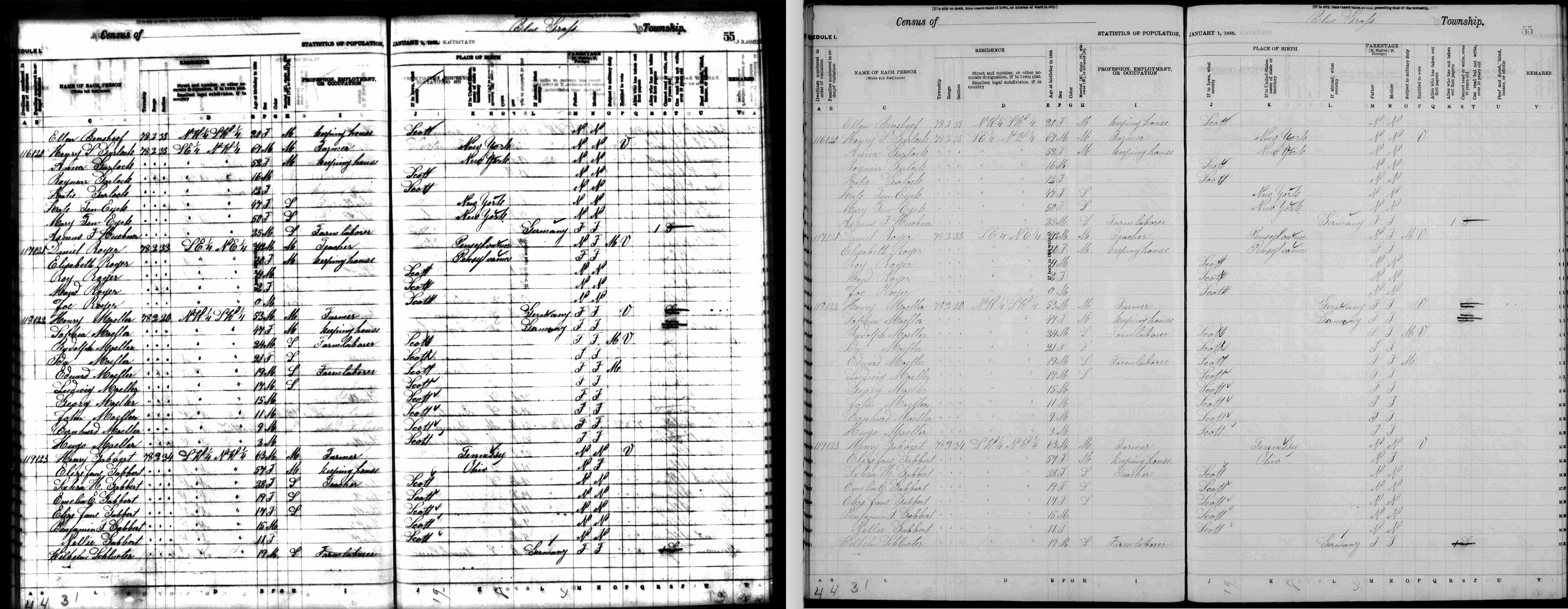
I blogged back in August 2018 in a post called No need to settle for bad scans about how I found a document on Family Search that was poorly scanned at Ancestry. It happened again this week when I was researching the family of my third great grandfather, Henry S. Garlock (1817-1909). The issue was that the main information in the 1885 Iowa census was legible, but the column headers were fuzzy. So I did a Google search looking for an explanation of the column headers. And that led me to a much more clear scan at Family Search.

Here they are side by side (click the photo to see them larger):
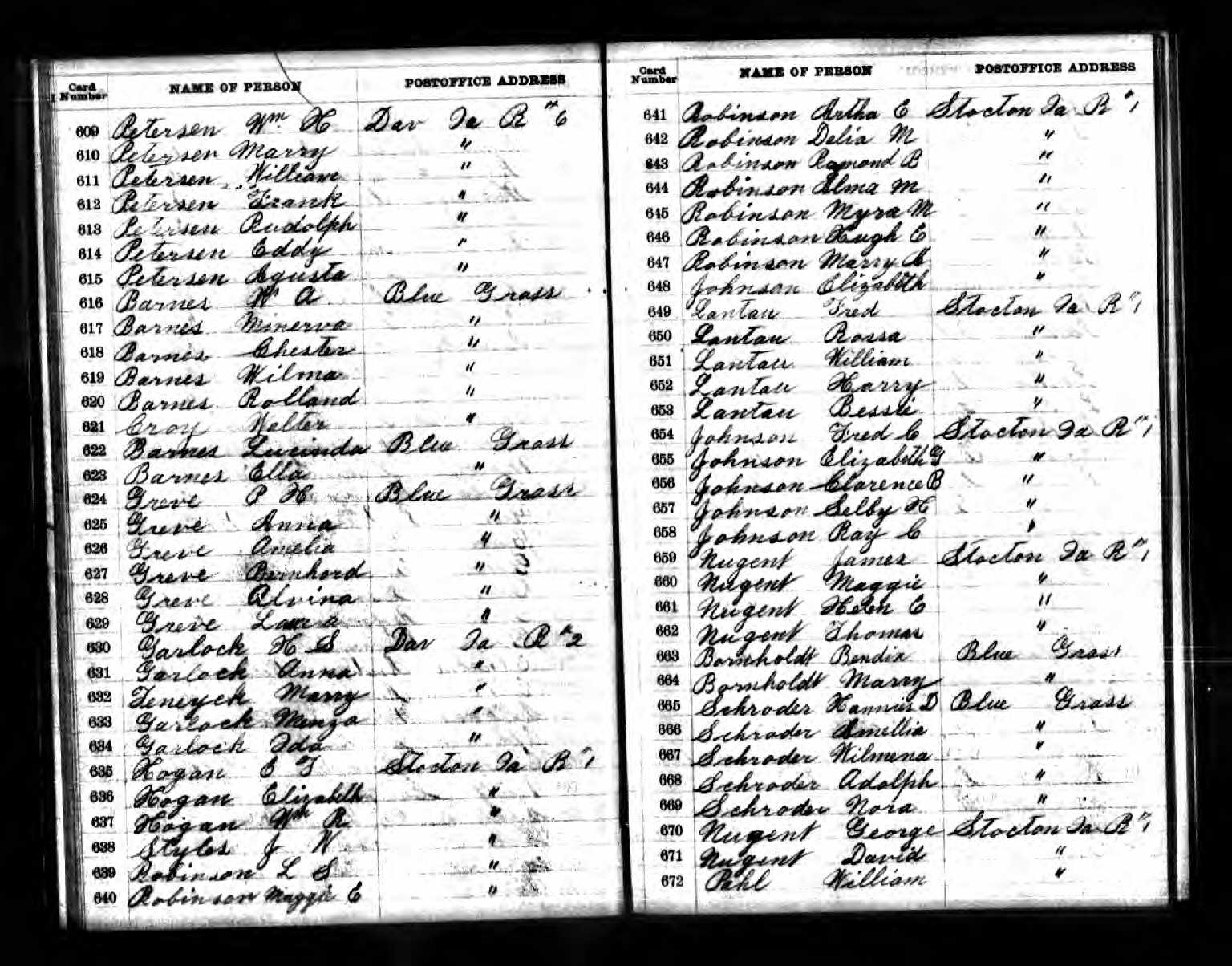
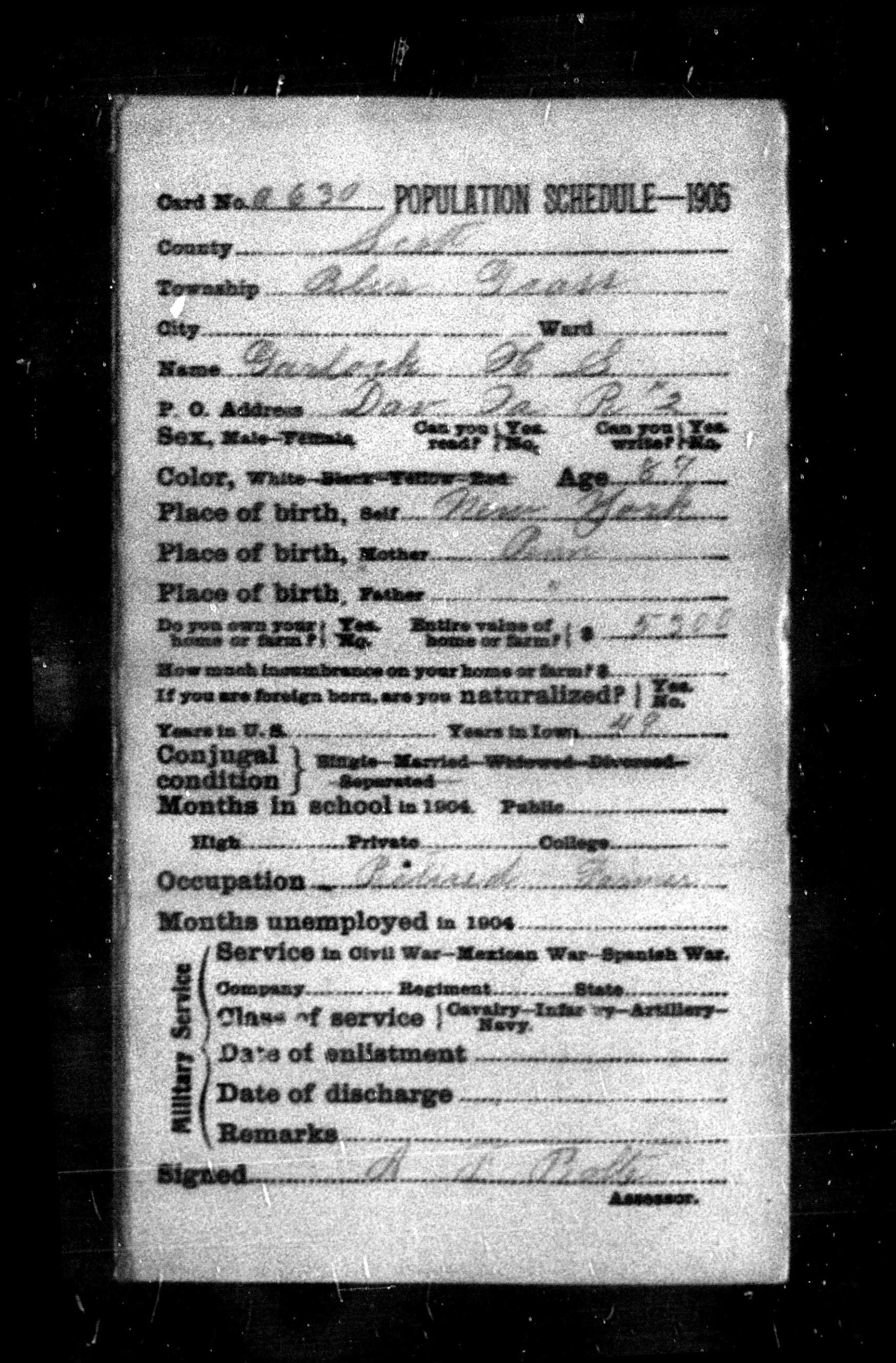
The next day, working on this same family, I was examining a document I’d downloaded from Ancestry that was for the 1905 Iowa census. It provided so little information I clicked on  “About this collection” on Ancestry and all it said was, “This collection includes census records from Iowa in 1905. You can learn more about this collection at the FamilySearch website.” When I clicked on that link I discovered that the 1905 Iowa Census consisted of individual cards for each person and the page I’d downloaded from Ancestry was simply an index to those cards!

This is the census document I found on Ancestry:
And this is an example of one of the cards. So much more information!
It was nice to have this important reminder to check more than one repository for important information. I hope it helps you!

Filed Under: Challenges, Genealogy tips Tagged With: electronic files, Garlock, genealogy tools, research, technology

Major upgrade to Reunion released

November 3, 2020 By Janine Adams 19 Comments

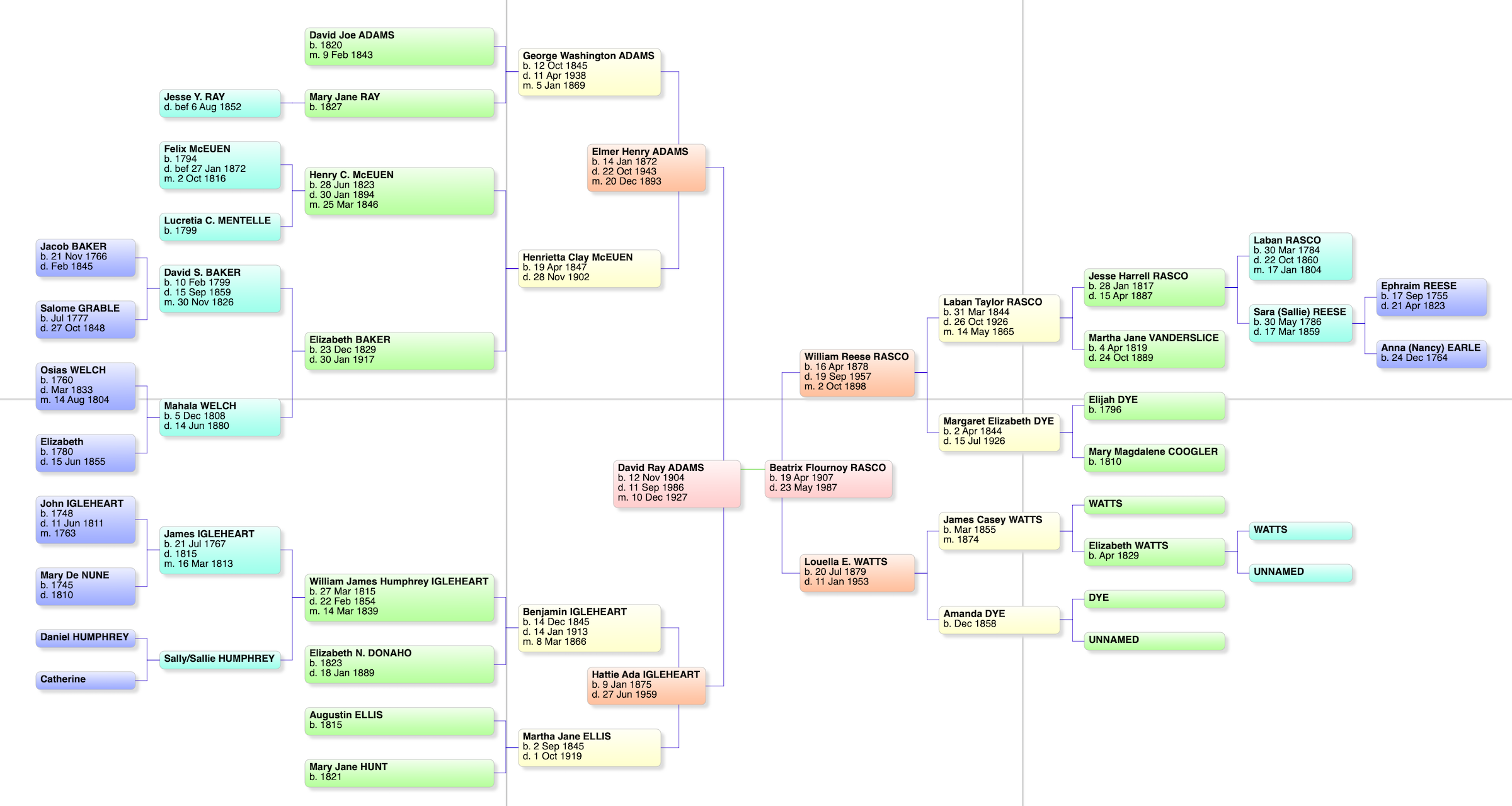
A bowtie chart for my paternal grandparents

I’ve been using Reunion, the genealogy software designed for the Mac, since I started getting serious about genealogy research, back in 2012. I love Reunion, though the truth is I’ve never used any other software so I don’t have anything to compare it with. It works well with the way I think and I’ve found it intuitive and easy to use. I’m definitely a glass-half-full kind of gal, but the only complaint I’ve ever had about Reunion is that media files do not export with a GEDCOM.

Over the years, I’ve upgraded Reunion when new versions became available every few years. (I started with Reunion 10.) Just last week when I opened the program, I saw that an upgrade to Reunion 13 was available. (It had been three years since I upgraded to Reunion 12.) I quickly checked out the new features and didn’t hesitate to spend $49.95 for the upgrade. The upgrade process was headache-free and I’m happily using and exploring the expanded capabilities.

Here’s a list of my favorite new features. I haven’t used them all but I’m glad to have them available:

  • Change Log. I can now look back and see what changes I made each research session. I used this the other day when I forgot to write in my research log. (I think the Change Log is a little hard to find, so I’ll mention that you find it by clicking on the File menu item at the top of the screen. If you don’t see Change Log, try clicking on a different screen in Reunion, if you have more than one open.)
  • Summary sidebar. Personal statistics for each member of a couple are now available in the sidebar. The summary sidebar contains information such as spouses, siblings, surnames of ancestors, surnames of descendants, number of descendants in how many generations and so forth. You can drill down on most statistics for more detail.
  • Connections allows me to add unrelated people (neighbor, godparent, witness, etc.) to my tree.
  • Find Relationship has been upgraded to instantly show a graphic relationship between to people in my tree. I can easily copy that graphic to share with someone.
  • Quickview windows pop up to provide further information about a person, couple, source record or surname without having to navigate to another record.
  • A Find feature that searches across all records and fields. You can search without having to leave the family view.
  • A new Bowtie chart that shows the ancestors of each member of a couple in one view (see photo above).

You can watch this video to see the top ten new features in action.

Eight years using Reunion and I haven’t been tempted to switch. This upgrade makes me feel more enthusiastic than ever!

Filed Under: Excitement, Genealogy tips, Technology Tagged With: genealogy tools, record keeping, technology

A special 90th birthday present

September 25, 2020 By Janine Adams 18 Comments

My dad, Gene Adams, two days shy of his 90th birthday

I am so happy to be posting again! I left St. Louis on September 6 to drive to 2,000 miles to Walla Walla, Washington, to help my father celebrate his 90th birthday. (He was born 11 Sep 1930.) I drove because I didn’t want to risk transmitting the coronavirus to him and I felt more in control of who I interacted with driving than flying. On the way, my MacBook Pro went belly up and I ended up having to send it in to Apple for repair. I wasn’t up to trying to blog from my phone, so that’s why I haven’t blogged for a couple of weeks.

In any case, my computer has been returned good as new (it had a swollen battery that had to replaced) and I’m delighted to be back to blogging.

I had a lovely visit with my father, whom I hadn’t seen since February, and I’m so glad I made the trip. I took four days/three nights in each direction and I drove alone. It was amazing to see this part of the country. I spent the night in two states, South Dakota and Montana, that I’d never been to before. That brings my total number of states visited to 48! I listened to lots of podcasts and I even managed to do a little cemetery research on the way home. (More on that in a future post.)

What I wanted to write about today is the birthday gift I gave my father. At 90, he doesn’t need stuff. Because of COVID, we couldn’t have a birthday party. So, at the suggestion of a friend, I reached out to dozens of people from various parts of his life, asking each of them to send me a 30- to 60-second video wishing him a happy birthday and marking the occasion any other way they wanted to.

I used Trello to track my invitations and responses, which made it really easy. It was such a joy to communicate with these folks and receive their wonderful videos. I ended up with forty videos. I purchased an iPad for him so he can watch the videos when he wants. (He’s a Luddite with no computer and no internet access and no desire for either.)

I put the individual videos on the iPad and also used iMovie on my Mac to string them all together into one video, which I put on the iPad. That turned out to be the way he likes to watch it most. Finally, I bought a lightning-to-HDMI adapter so that he can watch the video on his TV. I did everything manually and found it quite easy, but since then, I have found out about a service that will send out the invitations and the compile the videos for you for a small fee. It’s called VidHug.

He was blown away. Because he’s a Luddite I think he thinks it was a lot harder for me to do than it actually was, though I tried to set him straight. The hardest part was finishing the project without a computer! He really enjoyed hearing from so many loved ones. The video was just plain heartwarming.

This is the best gift I’ve ever given (I’m not great at gift giving) and my father appreciated it so much. I mention it here in case you have an elderly relative (or, really, anyone) you’d like to honor this way.  It seems particularly helpful these days when travel and in-person gatherings are so difficult.

Filed Under: Challenges, Excitement, Genealogy tips, My family Tagged With: Adams, excitement, technology

MyHeritage offering free photo colorization

April 22, 2020 By Janine Adams 13 Comments

When I was at RootsTech, MyHeritage had a booth where they were colorizing old black-and-white photos for people. The booth was always swamped with people. I wasn’t one of the people who stood in line for this service because the whole idea of colorizing old photos just didn’t sit right with me. I couldn’t put my finger on my objection, exactly. But I’m curious what readers of this blog think.

Today, I thought I’d blog about it, so decided to upload a couple of photos to try it out for a spin.

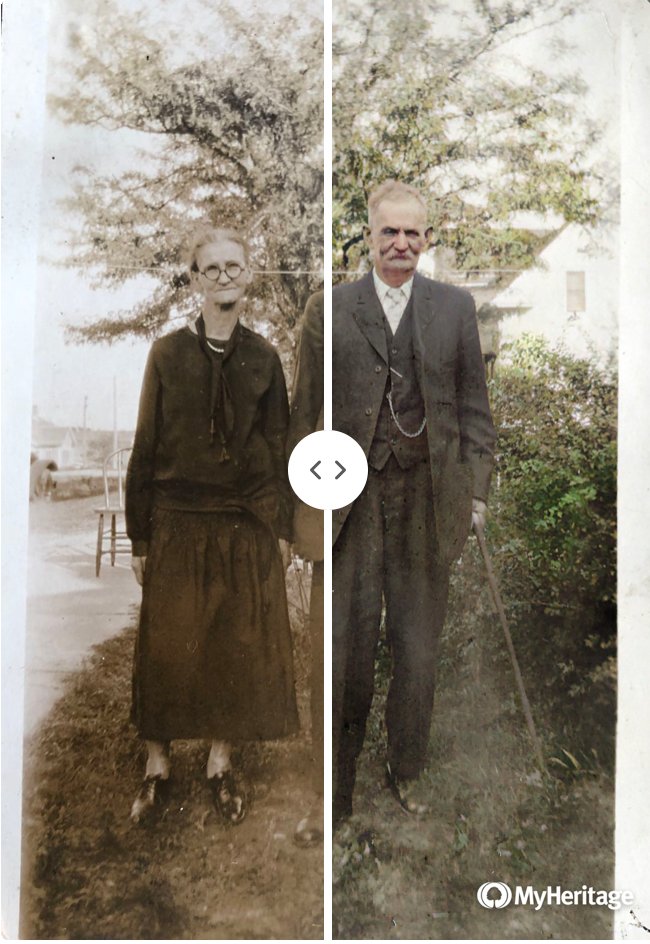
At left (at the top of this post) is a photo of my 2nd great grandparents, Samuel Vorce Wheeler (1852-1937) and Elizabeth Jane (Jennie) Nebergall Wheeler (1857-1933), taken in 1926 on the occasion of their 50th wedding anniversary. MyHeritage allows you to see your colorized and original photos side by side in one photo. You can move the dividing line back and forth and watch the photo change. That happens at the MyHeritage website–for the purposes of this post I took a screenshot. The photos you download (like those below) do not have the divider.

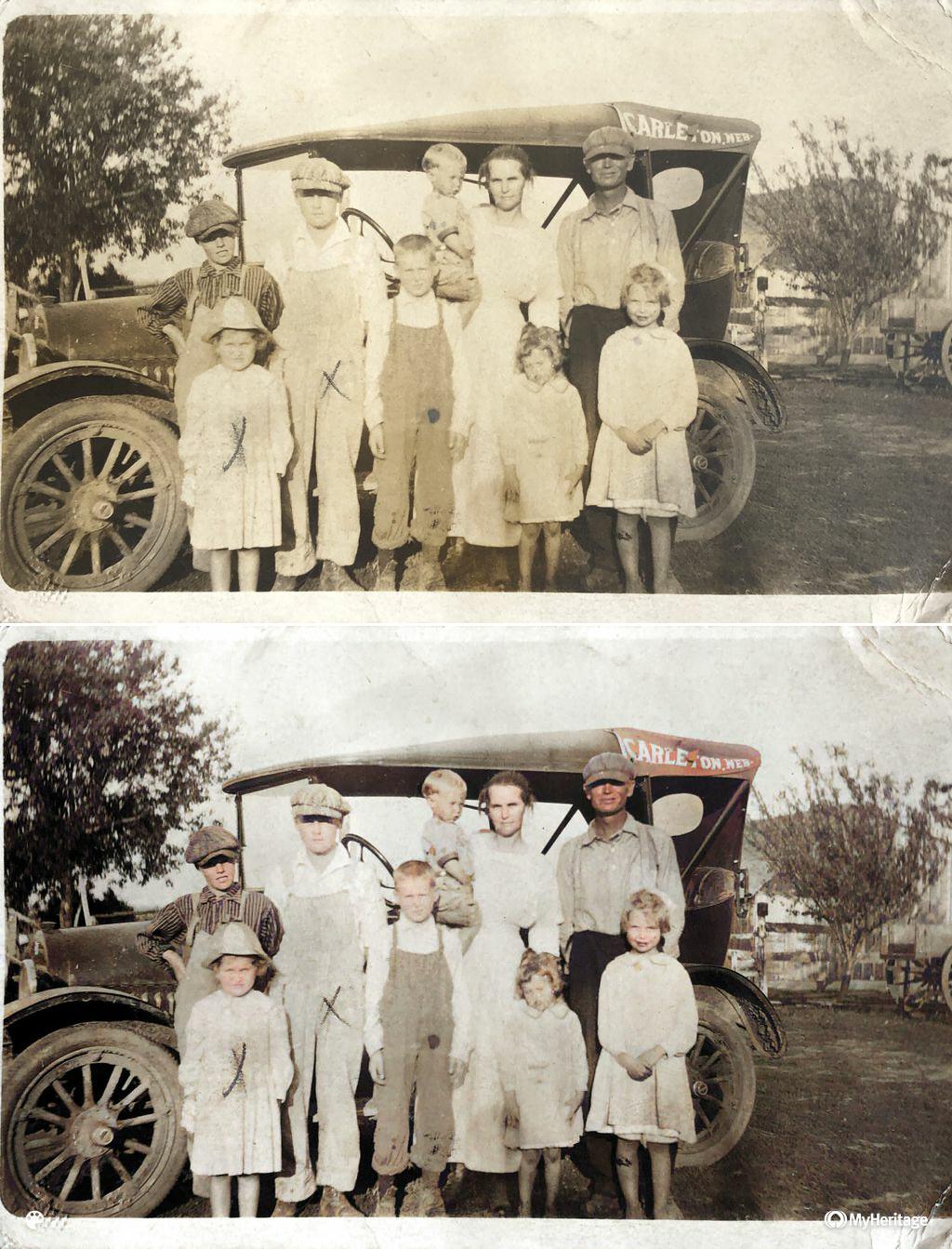
Here’s a photo of the Arthur Brown-Rhoda Wheeler family. (Rhoda is the daughter of Samuel and Jennie.) That’s my grandfather, Crawford Brown (1906-1996), on the far left with the dark striped shirt. I think the photo was taken around 1916. The top photo is the original that I uploaded. (I took a photo of the print with my phone, transferred it to my computer, and uploaded it.) Beneath is the colorized version.

I have to admit I find the colorized version more eye-catching. But it doesn’t feel like a 1916 photo, does it?

It’s incredibly simple to upload the photo to the MyHeritage site (just drag and drop). The colorizing takes seconds. There’s no charge. With a click, you can download the colorized version and/or a comparison photo that contains both images.

It’s amazing, but I’m still not sure quite what to think about it. I do know that I’m not going to include the colorized versions among my genealogy documents–they’re purely for fun.

Have you tried it? What are your thoughts?

Filed Under: Genealogy tips, Preservation, Reflections, Technology Tagged With: Brown, family photos, genealogy tools, technology

  • « Go to Previous Page
  • Page 1
  • Interim pages omitted …
  • Page 3
  • Page 4
  • Page 5
  • Page 6
  • Page 7
  • Interim pages omitted …
  • Page 20
  • Go to Next Page »

about me

I'm Janine Adams, a professional organizer and a genealogy enthusiast. I love doing family history research, but I find it's very easy for me to get overwhelmed and not know where to turn next. So I'm working hard to stay organized and feel in control as I grow my family tree.

In this blog, I share my discoveries and explorations, along with my organizing challenges (and solutions). I hope by sharing what I learn along the way I'll be able to help you stay focused and have fun while you do your research, too.

tags

30 x 30 Adams amy johnson crow anniversary Brown cemetery census Civil War conferences connections dna electronic files Evernote excitement Family Curator family photos genealogy tools getting started goals How They Do It Igleheart Jeffries keepsakes learning opportunities maps newspapers NGS organizing aids overwhelm paper files planning quick tips rasco record keeping research research log research trip resources RootsTech social history source documentation Stacy Julian technology time management vital records

join the facebook community!

join the facebook community!

My organizing business

Learn more about my organizing business, Peace of Mind Organizing®.

Subscribe by RSS

  • RSS - Posts
  • RSS - Comments

© 2026 Janine Adams


Loading Comments...