• BLOG
  • ABOUT
    • Privacy Policy
  • CONTACT

Organize Your Family History

Stay focused and happy while exploring your roots

Let’s start a November 30 x 30 challenge!

November 1, 2017 By Janine Adams 29 Comments

How’d you like to join me in committing to doing 30 minutes of genealogy research for the 30 days of November? I think November is a particularly great month for a 30 x 30 challenge, at least for those of us in the United States, since it’s the month of the Thanksgiving holiday, when many families get together. What better time to do some research in anticipation of asking questions of family members or sharing findings with them?

I’ve been doing periodic 30 x 30 challenges since August 2015. They’ve really helped me stay focused on my research. I love the public accountability and support. And I’ve learned they help create a habit of daily research. This one’s for you, not for me, because–believe it or not–I’ve been researching daily since my August 2017 challenge! That’s three months in a row without missing a day. I feel like it’s become a wonderful habit; I absolutely love starting my day with genealogy research.

I’d love to support you in a 30 x 30 challenge this month so that you can experience the joy of creating this habit. Who wants to join me?

Some time in the next couple of weeks, I’ll write a post about the benefits of brief, daily research…it’s really quite different from the sporadic, longer sessions I used to do in the past.

Just post a comment if you’d like to join the challenge!
Filed Under: Challenges, Excitement Tagged With: 30 x 30, time management

How indexing might make me a better genealogist

October 25, 2017 By Janine Adams 8 Comments

I participated in the Worldwide Indexing Event this past weekend. I’m so glad I did! I’m really grateful to Family Search for making it so easy.

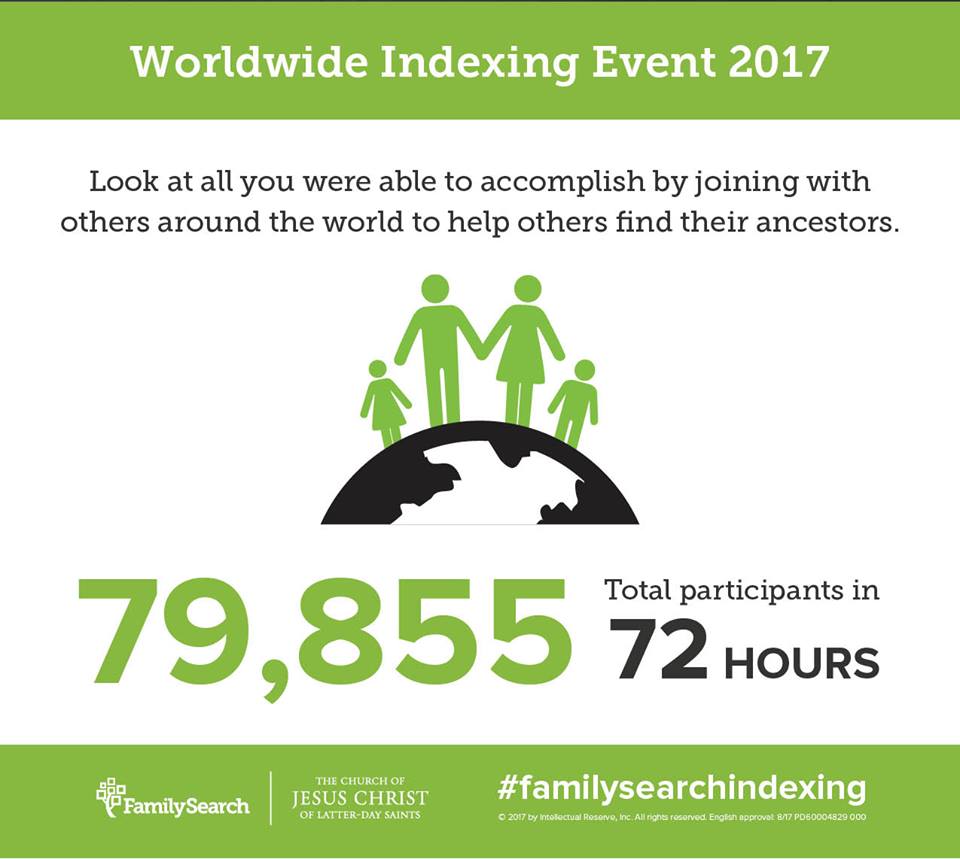
By all appearances, the Worldwide Indexing Event was a big success. Almost 80,000 people participated and 7.2 million records were indexed. I indexed 541 of those records.

I ended up working at the intermediate level, indexing school censuses from Oklahoma schools in the first few decades of the 20th century. These were handwritten cards, each listing a parent and that parent’s children’s names, birth dates and ages. It was fun seeing the names and the birth dates of these kids–some of these families were large!

As I indexed, I realized that I was gaining new insights that would help me in my own genealogy research. I think seeing the challenges of interpreting handwriting, as well as the sloppiness of some of the enumerators, will help me come up with creative searches when I can’t find an ancestor in an index.

Being an indexer also made me realize how easy it is for mistakes to be made. Family Search makes indexing really easy, but if I hadn’t double-checked my work, many August birth dates would have been recorded as April. And a few boys with names like Marion would have been indexed as girls. I’m glad there are arbitrators checking the work, but now when I see errors in an index, I’m going to have a better understanding of how that happened.

Now that I’ve dipped my toe in the indexing pool, I’m going to try to do some indexing for Family Search on a regular basis. If you haven’t tried it, I encourage you to give it a try. Just go to FamilySearch.org, log in, and click Indexing at the top of the screen.

Filed Under: Challenges, Genealogy tips Tagged With: indexing

How I process a downloaded document

October 20, 2017 By Janine Adams 14 Comments

Last March, I wrote a post called My digital workflow that detailed what I do with a document I find on the Internet. (I never print it.) My digital workflow has not changed since then and it’s working out really well for me.

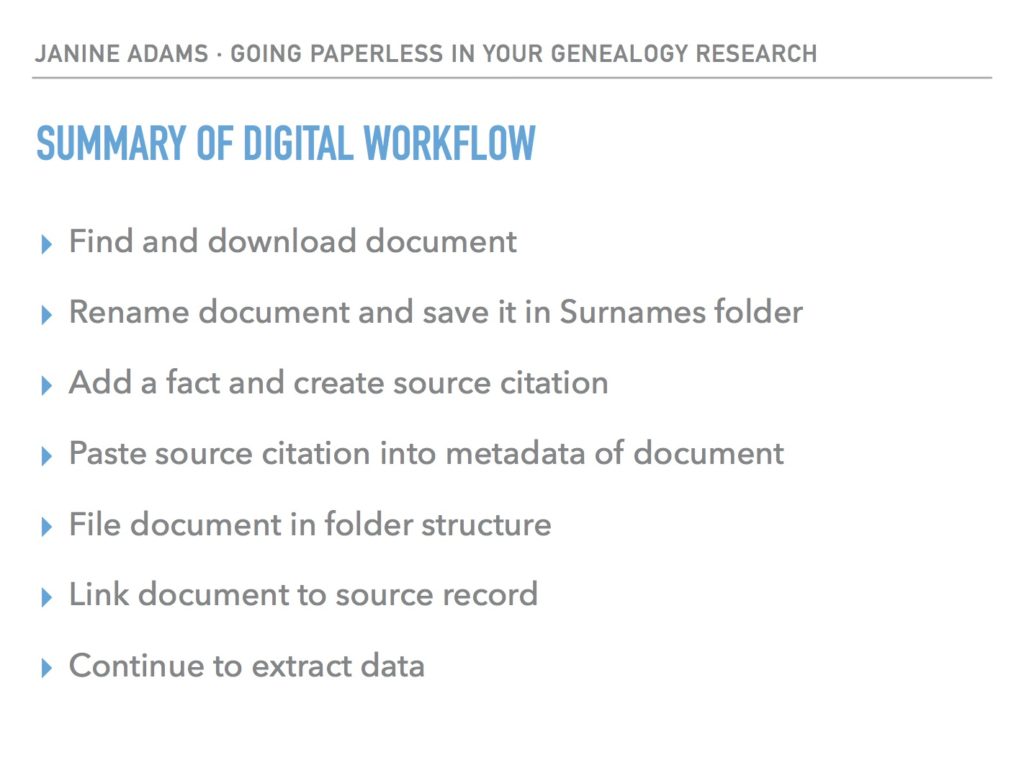
Last weekend, I did a talk at the St. Louis Genealogy Conference about going paperless and in my Powerpoint I included screenshots of the digital workflow and also a summary slide. The attendees asked for copies of the summary slide, so I decided to post it here.

The process is basically the same as my March post but I switched up the steps a little.

The example I used in my talk was my father’s uncle, Jay Ellis Adams (1914-2004). I had found his obituary online at the newspaper’s website. Here’s the workflow:

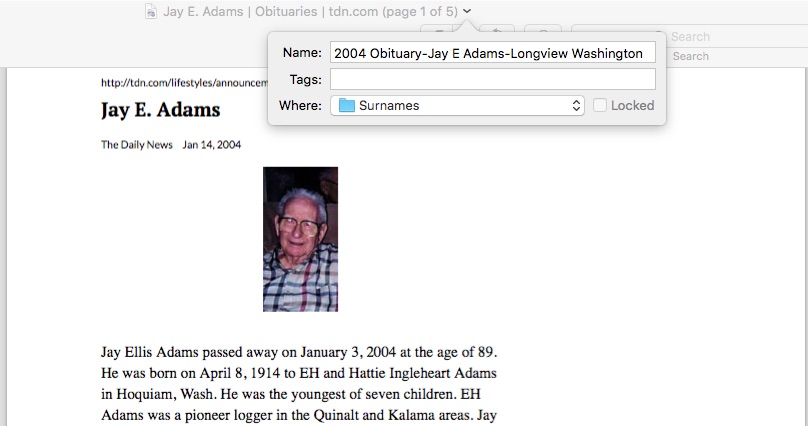
1. I click Print and, in the printer dialog box, Open in Preview (my Mac’s default pdf reader), which downloads the document to my computer. (If it had been a document at Ancestry, I would have clicked Save, then Save to My Computer.)

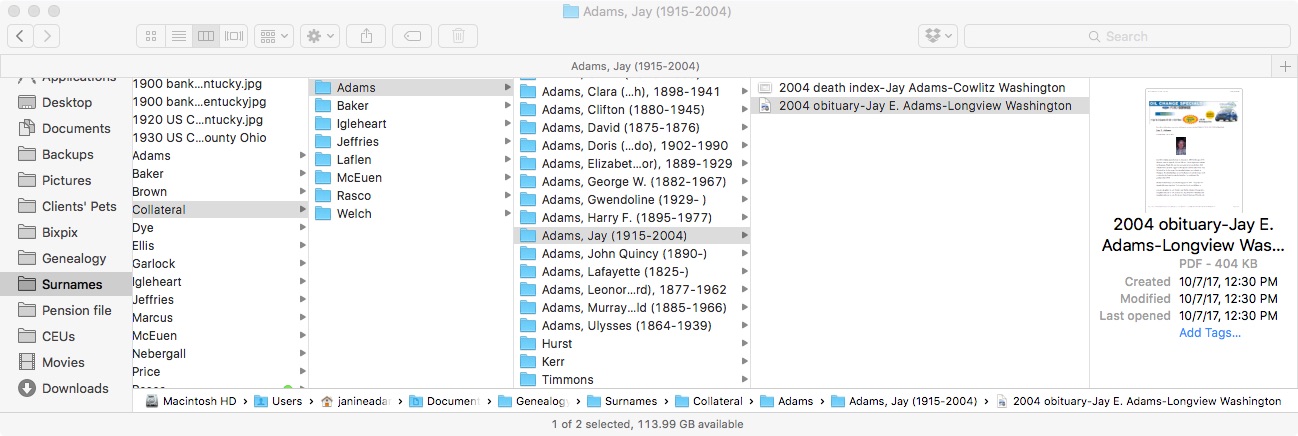
2. I immediately rename the file, using my file-naming protocol, which is Date Type of Document-Ancestor Name-Locality. I stick it into my Surnames folder, as a temporary holding place until I file it in step 6. I know that any unfiled documents in the Surnames folder require processing.


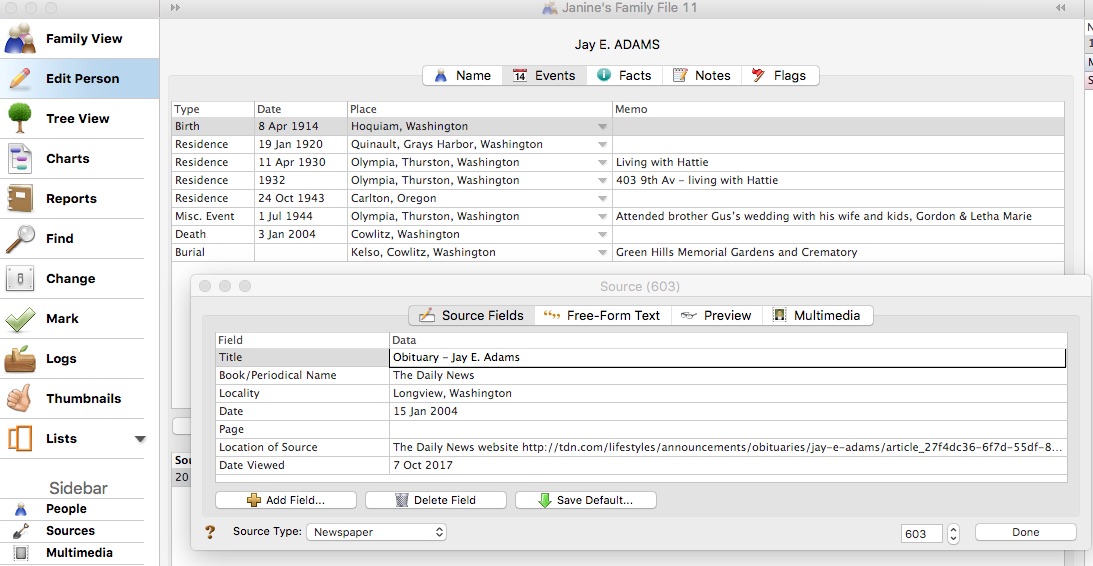
3. I select a fact from the document, add it to Reunion and create a source citation for it.


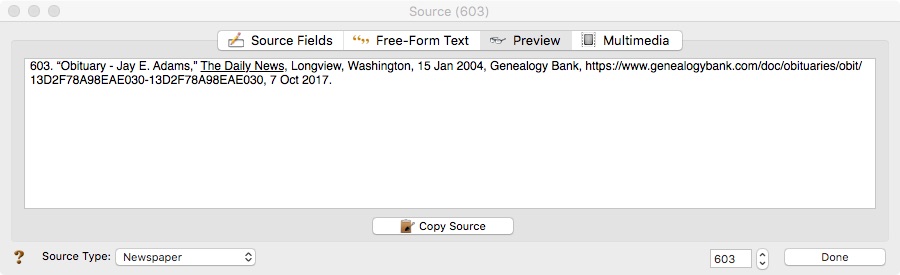
4. In Reunion, I click the Preview tab in the source record and then click Copy Source. (For the eagle-eyes among you, I originally found a transcript at Genealogy Bank and used that as the source citation. Then I decided to go to the newspaper’s website and download it from there, so I changed the source citation. But I was too lazy to take a new screenshot.)

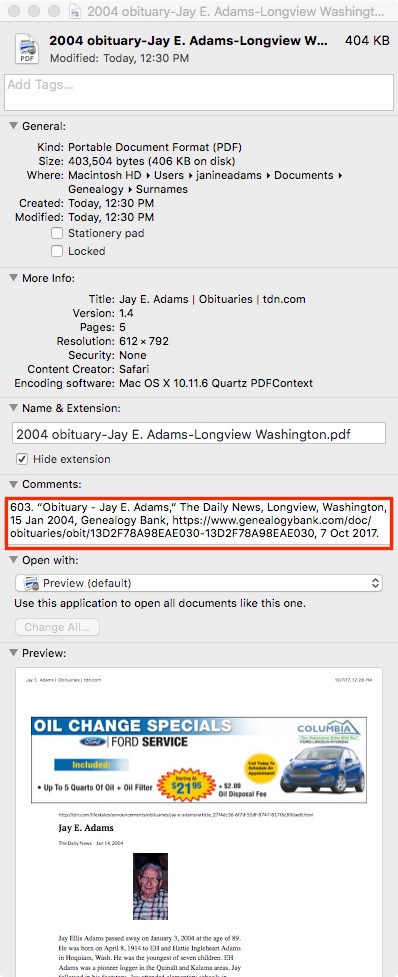
5. I paste the source citation into the metadata of the source document (the obituary) by Ctrl-clicking on the file and selecting Get Info from the menu that appears, then pasting into the Comments area.


6. Then I file the document into my folder structure. My folder structure for collateral relatives is Genealogy/Surnames/Collateral/[Surname]/[Name of Ancestor (YOB-YOD)]. If the document  applies to multiple people, I duplicate it for each person and then drag it into the appropriate folder for each person. But I don’t take the trouble to rename it.

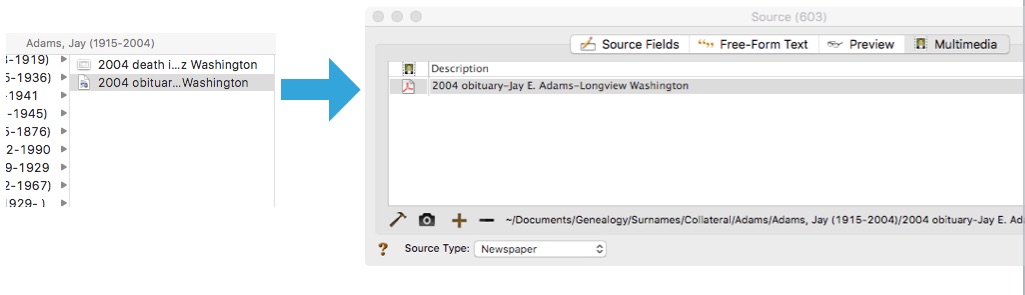
7. The final step is to drag the document into the Multimedia area of the source record in Reunion. This creates a link to the document so that I can open it up inside Reunion, which is very handy.


From there, I continue to extract information from the source document and add that it to Reunion. Every piece of information I glean from a single source document uses the same source number, no matter what person it applies to.

Here’s the summary slide:

This is the way I do and it works well for me. Of course, it’s not the only way to do it or perhaps the best way to do it. But I’m hoping you’ll find it useful to see my workflow. I’ve been processing documents this way for almost a year now and it’s working very well.

For more in-depth information on how I organize my own genealogy, check out How I Do It: A Professional Organizer’s Genealogy Workflow, a 37-page downloadable pdf available for $19.99.

Filed Under: Challenges, My family, Organizing, Technology Tagged With: Adams, electronic files, organizing aids, record keeping, source documentation

Keeping track of my progress

October 10, 2017 By Janine Adams 16 Comments

Keeping track of genealogy researchThis year, I’ve been focusing on one family line, the Adams line. I’ve been trying to gather as much information as possible not just on my direct-line ancestors (my focus in past years) but also on the siblings of my direct-line ancestors. It’s fun and fulfilling. But it’s also a bit overwhelming because there are so many people I can’t remember all of them.

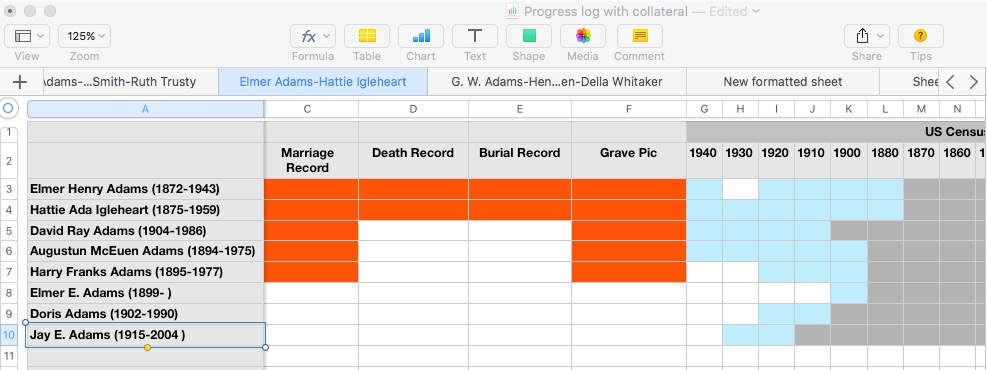
I keep track of everything in my family-tree software, Reunion. But I also like having an at-a-glance summary of where I stand in my research on each person. Three years ago, I created a progress chart, which had a series of tabs on a spreadsheet in which I marked the documents I had found on each of my direct-line ancestors. That worked pretty well and gave me an at-a-glance summary I craved.

I find myself wanting a similar chart for all my research subjects, including the collateral lines, and I’m struggling with getting my arms around that. Part of my problem, I think, is that I want to be able to see everything at the same time, which is challenging when your family tree’s branches stretch wide.

Here’s what I’ve settled on. I’m creating a single spreadsheet for all the data I’m looking for for each family group (B/M/D, censuses, newspaper, military, wills, land, etc.). In my previous progress chart, I’d had all my direct-line ancestors listed on each sheet, with a separate sheet for each type of data. In this new chart, I have all my data types across the top, with a row for each member of the family group. I have a separate sheet (a tab) for each family group. I decided to start with my parents in the first sheet and work back in time by generation.

I’ve spent a little time with it and I think it’s going to be really helpful. As I started filling it out, I paid attention to how it made me feel and I had two conflicting feelings:

  • Overwhelm because there are so many people to enter into it and so many data types to research
  • Excitement as I realized how many opportunities for research there are

I think the key to making this useful and not overwhelming is putting one family group on each sheet. That narrows the focus and allows me to see what I have and what I can still research. It also helps me avoid feeling overwhelmed.

Having each family group on a separate sheet makes it easier to fill out the chart initially as well. I ordinarily enjoy filling out forms and updating progress charts. But this one was so large it felt like it might turn into a big exercise in tedium. So if I take it one family group at a time, it feels like fun, not drudgery.

I’ll keep you posted. Once I have it in shape where I think it might be useful to others, I’ll blog again and offer to send it to anyone who might want to use it.

If you have a similar chart and/or have any suggestions for mine, please share in the comments. I’m all ears!

Filed Under: Challenges, Genealogy tips, My family, Organizing Tagged With: organizing aids, overwhelm, planning, progress log, research, research log, resources

  • « Go to Previous Page
  • Page 1
  • Interim pages omitted …
  • Page 64
  • Page 65
  • Page 66
  • Page 67
  • Page 68
  • Interim pages omitted …
  • Page 109
  • Go to Next Page »

about me

I'm Janine Adams, a professional organizer and a genealogy enthusiast. I love doing family history research, but I find it's very easy for me to get overwhelmed and not know where to turn next. So I'm working hard to stay organized and feel in control as I grow my family tree.

In this blog, I share my discoveries and explorations, along with my organizing challenges (and solutions). I hope by sharing what I learn along the way I'll be able to help you stay focused and have fun while you do your research, too.

tags

30 x 30 Adams amy johnson crow anniversary Brown cemetery census Civil War conferences connections dna electronic files Evernote excitement Family Curator family photos genealogy tools getting started goals How They Do It Igleheart Jeffries keepsakes learning opportunities maps newspapers NGS organizing aids overwhelm paper files planning quick tips rasco record keeping research research log research trip resources RootsTech social history source documentation Stacy Julian technology time management vital records

join the facebook community!

join the facebook community!

My organizing business

Learn more about my organizing business, Peace of Mind Organizing®.

Subscribe by RSS

  • RSS - Posts
  • RSS - Comments

© 2026 Janine Adams


Loading Comments...