• BLOG
  • ABOUT
    • Privacy Policy
  • CONTACT

Organize Your Family History

Stay focused and happy while exploring your roots

Figuring out what’s relevant

September 27, 2016 By Janine Adams 24 Comments

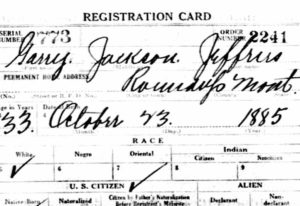
Figuring out what's relevantWhen you’re doing genealogy research, it’s easy to stumble on facts you’re not looking for. Let’s say you’re researching your great grandfather. Ancestry gives you all sorts of information about his brother. Do you take the time to carefully document the information on the brother?

This isn’t exactly hypothetical. This happened to me this morning. Five years ago, I would have skipped that information and kept my focus on my great grandfather. Now I know better.

After about ten years of genealogy research, there’s one thing I’m pretty sure about.

Every documented fact is relevant. Or might be some day.

Why should I bother to document the marriage certificate and draft registrations for Garry Jeffries (brother of my great grandfather James E. Jeffries)? Here are a few reasons that pop to mind:

  • I get a clearer picture of my family.
  • I might be able to help one of his descendants, a cousin of mine, one day by including this information in my family tree.
  • Down the road I may learn something about the relationship between my great grandfather and his brothers and this information might help connect the dots.
  • As commenter Marcia Philbrick said, “Those brothers, sisters and their descendants may be the clue to break through brick walls.” (Thank you, Marcia!)

I’m sure that’s just the beginning. Basically, I’ve come to the conclusion that since I can’t see what puzzle pieces I’m going to need in the future, it benefits me to take the time to record and download all the documents I come across, even if they’re not for my direct line ancestors. (Here’s how I process that information.) It can feel tedious and also feel like it’s taking me away from my “real” research. But I think it’s worth it.

After all, genealogy research is a marathon, not a sprint.

Filed Under: Challenges, Genealogy tips, My family Tagged With: Jeffries, organizing aids, planning, record keeping, research

I’m speaking at RootsTech 2017!

September 20, 2016 By Janine Adams 17 Comments

rootstech2017I’m both delighted and nervous to announce that my speaker proposal to co-present at RootsTech 2017 was accepted!
I will be presenting with the amazing Brooks Duncan of DocumentSnap. Our talk is titled “Go Paperless: Streamline and Digitize Your Research.” Brooks is the guru of all things paperless–he has amazing knowledge about the process of scanning and digitizing. I’m bringing my organizing and genealogy know-how to the table.

Brooks is a terrific speaker (and knows how to create a great PowerPoint) and I’mĀ  confident we’ll create a fun and informative presentation. I’m really looking foward to it.

RootsTech will be held February 8 to 17 in Salt Lake City. This will be my third year attending and my first presenting. Registration is now open! Until October 14, you can register for the full conference for $159, a $100 savings over the regular price. (The price goes up to $189 on October 14.)

Are you attending? Speaking? Leave a comment here or shoot me an email and let’s meet up!

Filed Under: Challenges, Excitement, Organizing, Technology Tagged With: conferences, learning opportunities, RootsTech

How I store my genealogy information

September 16, 2016 By Janine Adams 36 Comments

reuniononmac90I love organizing my family history research electronically. As I’ve mentioned here many times, I try not to print digital documents and instead store everything electronically where I can have easy access to it.

I don’t think I have been clear when I talk about storing my genealogy data electronically that I’m not talking about storing it as a family tree on Ancestry or Family Search. I’m talking about storing it on my hard drive.

To me, it would be folly to rely on an outside service to store my precious genealogy data. If the only copy of my information was at Ancestry, I would be required to renew my subscription to access my own data. Even storing all my information at a free site like Family Search feels risky to me. It’s conceivable that they could change their terms of service to something unacceptable to me. Or start charging for access. Or simply vanish. Another place that some people store their genealogy documents is Evernote. I think that can be a great way to have easy, searchable access to information. But I wouldn’t store genealogy documents on Evernote that I don’t also have on my hard drive. They could go belly up. (It happened with Springpad.)

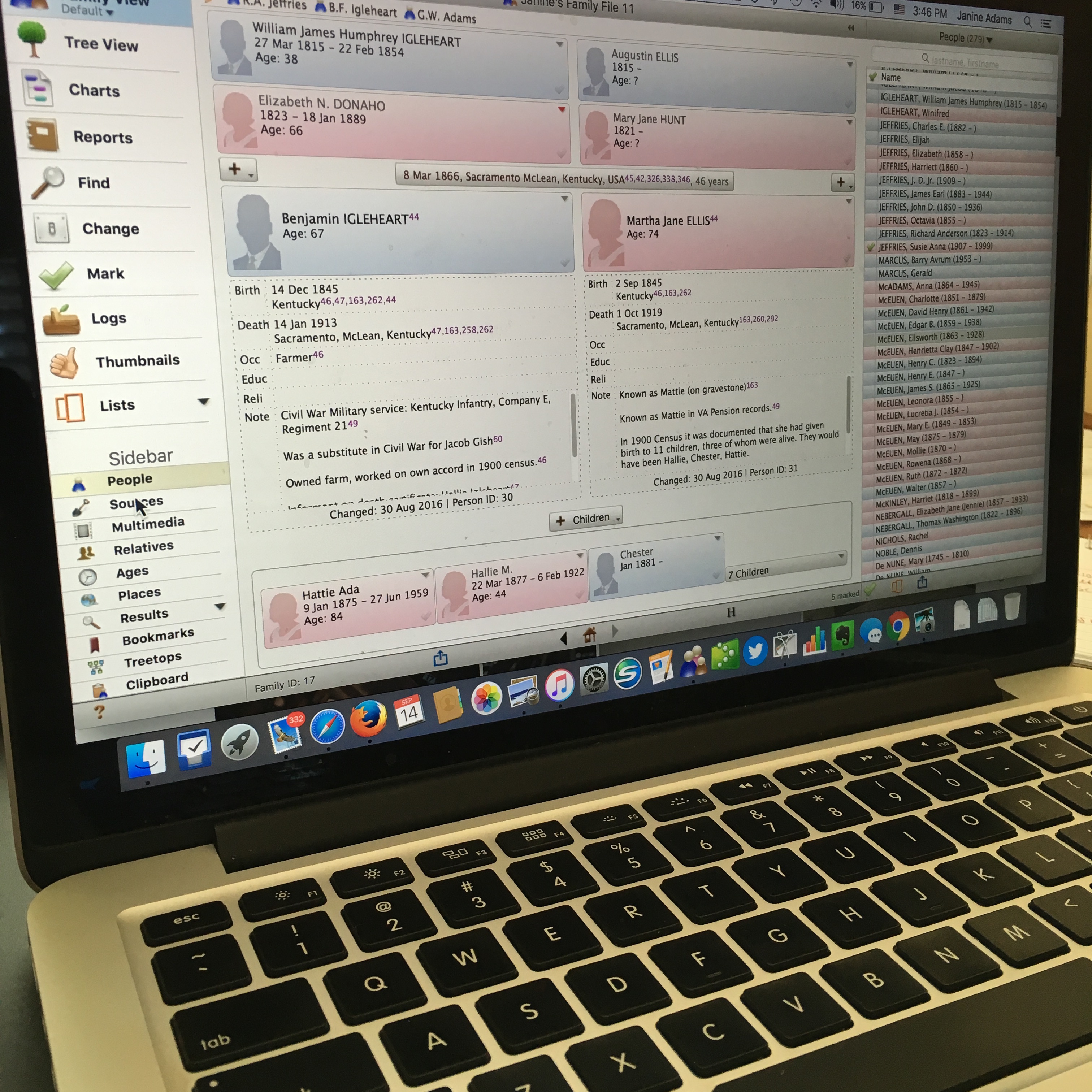
I enter all of my data into family-tree software that resides on my laptop’s hard drive. I use Reunion 11, a Mac program. It can sync with the iPhone and iPad using the ReunionTouch app. I haven’t yet installed ReunionTouch because I take my Mac with me on research trips. I like that storing my data on my computer, rather than an online service, is that the information is accessible even when I don’t have an internet connection (if I have my computer with me).

Of course, I back up my hard drive, both on an external hard drive and with an online backup service (CrashPlan Pro). Backing up is critical.

I’m not saying that my way is the right way or the best way. But I’ll share with you my process for storing info, in case you find it helpful or interesting. So far, it’s working well for me.

When I find a sourced piece of information pertinent to my research this is what I do:

  1. Add the information to the appropriate person(s) in Reunion (or add a person if need be).
  2. Cite the source in Reunion.
  3. Download the information (or scan it if I found it in paper form).
  4. Attach an image of the source document to the source citation in Reunion.
  5. File the digital document in that ancestor’s electronic folder on my hard drive, copying it if it applies to more than one ancestor.
  6. Scour the source for further information.
  7. Make a note in Evernote if it sparks potential further research.

So far this feels good to me and I haven’t second guessed it.

How do you store your family tree information?

Filed Under: Challenges, Organizing, Technology Tagged With: electronic files, organizing aids, record keeping, technology

Why I like to do cemetery research in person

September 14, 2016 By Janine Adams 10 Comments

I am so grateful for the volunteers who post pictures to Find A Grave and Billion Graves. It is such a selfless act and when I can’t see a grave in person I am thrilled when I find ancestor’s grave on one of these sites.

I have a tendency to want to see sources (or a scanned image in the case of documents) with my own eyes when I add them to my family tree. With Find A Grave, seeing a picture is often a terrific substitute.

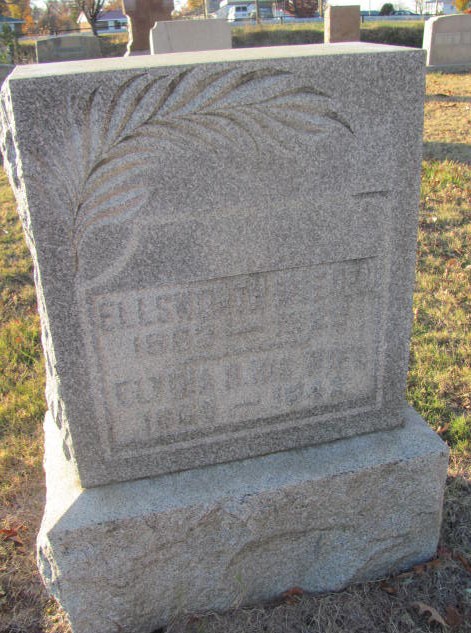
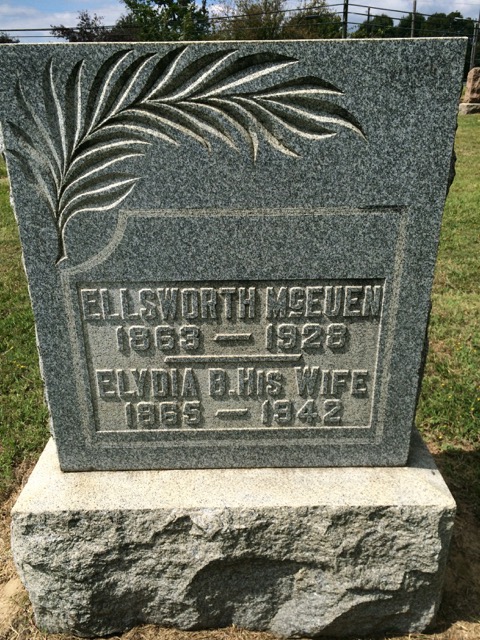
Recently when doing some research on the McEuen family (part of my Adams line) I was puzzled to see reference to a death date of 1929 on Find A Grave for Ellsworth McEuen (b. 1863), the brother of my great great grandmother, Henrietta Clay McEuen Adams. In my Reunion software, I had his death year as 1928. So I checked the source I’d associated with that 1928 date and it included a personal viewing of his gravestone. When I looked at my photo, I saw that it indeed said 1928.

The Find A Grave photo was less well lit and harder to make out. The wonderful volunteer who took the photo and uploaded the information, Anita Austill, interpreted it as 1929.

Looking at her photo, you can see why:

ellsworthmceuenfagrave

On my visit to that cemetery (the Cumberland Presbyterian Cemetery in Sacramento, Kentucky) two years ago, I was fortunate to have great lighting when taking a picture of that same gravestone. The 1928 date is crystal clear. (Click on the photos to see larger versions).

gravemarker-ellsworth-mceuen-mclean-ky

I’m not criticizing the volunteers who contribute these photos. I know that this gravestone was one of many that the photographer took and uploaded, whereas I was focused on my family members. But it does motivate me to take cemetery trips–which I enjoy!–even though photos are often available online.

Filed Under: Challenges, Genealogy tips, My family Tagged With: Adams, cemetery, mceuen, research, research trip

  • « Go to Previous Page
  • Page 1
  • Interim pages omitted …
  • Page 78
  • Page 79
  • Page 80
  • Page 81
  • Page 82
  • Interim pages omitted …
  • Page 109
  • Go to Next Page »

about me

I'm Janine Adams, a professional organizer and a genealogy enthusiast. I love doing family history research, but I find it's very easy for me to get overwhelmed and not know where to turn next. So I'm working hard to stay organized and feel in control as I grow my family tree.

In this blog, I share my discoveries and explorations, along with my organizing challenges (and solutions). I hope by sharing what I learn along the way I'll be able to help you stay focused and have fun while you do your research, too.

tags

30 x 30 Adams amy johnson crow anniversary Brown cemetery census Civil War conferences connections dna electronic files Evernote excitement Family Curator family photos genealogy tools getting started goals How They Do It Igleheart Jeffries keepsakes learning opportunities maps newspapers NGS organizing aids overwhelm paper files planning quick tips rasco record keeping research research log research trip resources RootsTech social history source documentation Stacy Julian technology time management vital records

join the facebook community!

join the facebook community!

My organizing business

Learn more about my organizing business, Peace of Mind OrganizingĀ®.

Subscribe by RSS

  • RSS - Posts
  • RSS - Comments

© 2026 Janine Adams


Loading Comments...
