• BLOG
  • ABOUT
    • Privacy Policy
  • CONTACT

Organize Your Family History

Stay focused and happy while exploring your roots

Sometimes you gotta browse

September 1, 2016 By Janine Adams 19 Comments

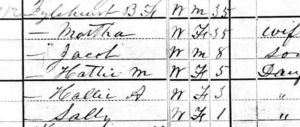
Sometimes you gotta browse recordsI was going crazy looking for my great great grandfather, Benjamin Franklin Igleheart, and his family on the 1880 census. None of my searches of various sites turned him up. I really wanted to find that census, because I knew from the 1900 census that his wife, Mattie, had given birth to 11 children, only three of whom were alive in 1900. I had found five of them, but I assumed that finding the 1880 census would reveal the names of more. (Mattie was 25 in 1870.)

So I decided I would browse my way through the census looking for the family. I had a good idea they were living in McLean county, Kentucky, where he lived before the Civil War. (He fought in that war.) I knew that in 1870 they lived in Arkansas, something I initially doubted but was confirmed in his Civil War pension record. But since they had a child born in 1881 in Kentucky, I felt comfortable trying Kentucky first.

I had found Ben’s mother and stepfather in the 1880 census in Sacramento, McLean, Kentucky, so I started there. I browsed forward a page at a time, scanning the handwritten names. After a few pages, I decided to start looking the opposite direction, so I went back to his mother and started scanning a page at a time backward. Sure enough, just two pages behind his mother, there they were! The words “Igleheart, B.F.” jumped right out at me. His age and his family members’ names and ages matched up. Eureka!

So why didn’t they show up on a search? A simple transcription error. The name had been indexed as “Lylehuist.” When I look at it, I can see why. (I bet you can too, if you squint at the image above.) In Ancestry, where I found the document, I edited the record to add the name Igleheart in order to help others. I don’t see that record coming up on a search of Igleheart, though.

The 1880 family included two children, born in the 1870s whose names I didn’t have. They’ve now been added to my family-tree software. I still have four more children to find.

I have to say, it was really exciting to spot this family. I was in a college library among strangers, so I managed to keep from shouting out.  I did raise both arms in victory, though!
Filed Under: Challenges, Excitement, Genealogy tips, My family Tagged With: Adams, census, Igleheart, research

Walking the paperless walk

August 26, 2016 By Janine Adams 16 Comments

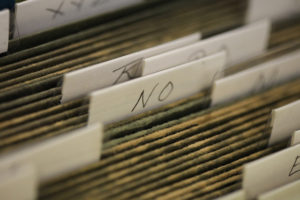
nofilesI’ve been blogging here through the years about my growing disenchantment with paper. I’ve stopped printing out documents I find digitally and instead save them to my computer and file them by surname. (That’s what works for me…you may choose to file differently.) I’ve started scanning notes and other genealogy paper that comes across my desk and discarding much of it after scanning. I do keep original documents as well as documents I’ve sent away for. But the vast majority of my genealogy information is not in my paper files
Last week when I was at the Allen County Public Library–I promise I’ll stop talking about that trip soon–I didn’t photocopy a single thing. Instead, I used the library’s copying machines to scan the documents I wanted to take home. I brought along a flash drive for that purpose and the process was very easy. The machines even allowed me to put all the documents from one source into a single file, rather than a file for each page. It does mean I had to rename each file and drag it to the appropriate folder on my hard drive. But I didn’t have a bunch of paper to process when I got home! Nor did I have paper to lug home. Or carry to the hotel from the library. Moreover, I was able to easily zoom in text to read it more easily. Not once did I wish I had a magnifying glass.

And here’s the kicker: The library (understandably) charges for paper copies. But they don’t charge a thing to scan to a hard drive, which was literally no more challenging than making a photocopy.

I feel better and better about limiting  paper in my genealogy research. It’s kind of amazing to me that just 3.5 years ago I was still printing much of what I found.

I was really pleased that my paperless inclinations were reinforced on my library trip!

Photo by Tom Woodward via Flickr. Used under Creative Commons License.

Filed Under: Challenges, Genealogy tips, Organizing, Technology Tagged With: electronic files, organizing aids, record keeping, technology

Hats off to pre-internet genealogists

August 23, 2016 By Janine Adams 9 Comments

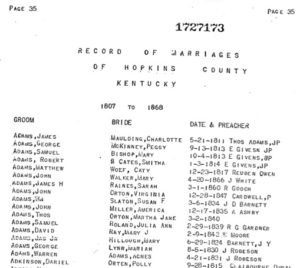
marriageindexIn my week at the Allen County Public Library, I was struck by how great it is to be a genealogy enthusiast in the era of the Internet. We can search for our ancestors with a few keystrokes and uncover documents and clues to further our research. We have unprecedented access to digital copies of actual primary documents. We can see original handwritten marriage certificates, for example, and interpret the handwriting ourselves, rather than trusting the indexer.

I looked at many indexes in written, bound form at the library. The snippet above is from a 1937 marriage index of Hopkins County, Kentucky. My 3rd great grandparents, David Adams and Mary Ray, are listed there. I was delighted to find this documentation of the date and county of their marriage.

Many of the bound indexes I consulted were typewritten. Some dedicated person had gone to a courthouse and written down all the entries in a marriage book, for example. I picture then squinting at the handwriting, taking their best guess at the names. (We often have an advantage when we’re looking for the names of our ancestors, because we know what we’re looking for.) They probably wrote them down on a sheet of paper, took them home and typed them up. Then they published them in book form or, sometimes, in the newsletter of a genealogy society or family newsletter or elsewhere.

When the genealogist researching a family found their ancestor’s name (or a facsimile of it) in one of these indexes or newsletters, they would then write the county courthouse to ask for a copy of the record and wait for it to arrive in the mail. This is how I imagine was how genealogy was often done. It was labor intensive. It was painstaking. And it was tedious.

Now, thanks to the hard work of our predecessors and, of course, to modern technology and the great work of thousands of volunteer indexers and organizations that are digitizing these documents, most of us can sit at our computers and get a whole lot of information without leaving our homes. It’s up to us to properly document it. And, if we want, to share it.

But, as I discovered at my week in the library, it can be really important to step away from the computer and do some off-the-internet research. Go to the cemeteries and find elusive gravemarkers. Go to courthouses in the counties where your ancestors lived and see if you can find the documents you haven’t been able to find online. And, yes, go to libraries and get big clues on furthering your research.

To our older relatives who were dedicated to genealogical research in the days when it was very labor-intensive, I offer my admiration and sincere thanks.

Filed Under: Challenges, Reflections, Technology Tagged With: genealogy tools, research trip, technology

How I’m using Evernote for genealogy

August 5, 2016 By Janine Adams 7 Comments

Evernote logoI have to admit I have been a slow adopter of Evernote. In 2013 and 2014 I posted here about how I wanted to give Evernote a(nother) try to help me organize certain aspects of my genealogy research. Well, it’s two years later and I’m happy to report that I am actually using Evernote to help organize a bunch of things in my life, including certain aspects of my genealogy research. I’ve become a big fan, though no one would describe me as a power user.

I thought it might be helpful to some people for me to describe how I’m using it for genealogy. Before I do, though, I want to emphasize that this isn’t the best way or the only way to use Evernote. It’s just the way I’m using it. And it will no doubt evolve.

So here’s a source list of ways I use Evernote in my genealogy life:

  1. Research log. I have a very simple template in Evernote in which I jot down what I’ve researched that session. Full disclosure: I don’t do it each and every session; I just do it when it feels right. Evernote makes it very easy.
  2. Genealogy task list. I have a notebook (in my Genealogy stack) called Genealogy clues/puzzles to check out. That’s where I make note of the things that come up that I don’t want to explore at the moment. I helps me stay focused on the task at hand.
  3. Source documentation project. As I described last month, I’m systematically reexamining all my sources in Reunion, verifying them, checking citations, ensuring that I’ve gleaned all the information I can out of them and adding images of each source to the citation. I keep the list in Evernote and check it off as I go.
  4. Keeping track of resources. I have a notebook called Genealogy resources where I clip interesting websites. Do I go back and look at it a lot? Not so much. But when I do there are usually some treasures in there. And clipping it means I don’t have to try to remember it, which frees up my mind.
  5. Genealogy travel. When I’m planning a research or cemetery trip, I keep notes about hotels, logistics, things to remember to pack, etc.
  6. Blog post ideas. I jot down ideas for this blog and my organizing blog when they occur to me. I consult it when I don’t know what to write. Which is quite often.

I don’t store my genealogy research in Evernote. After the 2015 National Genealogical Society meeting where I heard a detailed talk on using Evernote for genealogy, I briefly tried storing images of the genealogy documents I’d downloaded (census records, vital records, etc) in Evernote. I abandoned that as too labor intensive (though I can see the sense in it because it makes those documents exquisitely accessible). Instead, I attach those documents to the source citation in Reunion on my Mac.

In short, Evernote has become indispensable to me. It’s my go-to place to store and retrieve all manner of things (and I use it a whole lot for non-genealogy purposes as well). I pay for the premium version, so that I can access it when I’m not online. The price for the premium version just went up from $50 to $70 a year. I like it enough that I didn’t even consider not renewing because of the price hike.

Evernote is such a robust platform that I know I could be taking better advantage of it. And in a year I might be using it entirely differently. But right now it’s meeting my needs quite nicely.

How do you use Evernote for your genealogy research?

Filed Under: Challenges, General, Organizing, Reflections Tagged With: Evernote, organizing aids, research, research log, resources, technology

  • « Go to Previous Page
  • Page 1
  • Interim pages omitted …
  • Page 79
  • Page 80
  • Page 81
  • Page 82
  • Page 83
  • Interim pages omitted …
  • Page 109
  • Go to Next Page »

about me

I'm Janine Adams, a professional organizer and a genealogy enthusiast. I love doing family history research, but I find it's very easy for me to get overwhelmed and not know where to turn next. So I'm working hard to stay organized and feel in control as I grow my family tree.

In this blog, I share my discoveries and explorations, along with my organizing challenges (and solutions). I hope by sharing what I learn along the way I'll be able to help you stay focused and have fun while you do your research, too.

tags

30 x 30 Adams amy johnson crow anniversary Brown cemetery census Civil War conferences connections dna electronic files Evernote excitement Family Curator family photos genealogy tools getting started goals How They Do It Igleheart Jeffries keepsakes learning opportunities maps newspapers NGS organizing aids overwhelm paper files planning quick tips rasco record keeping research research log research trip resources RootsTech social history source documentation Stacy Julian technology time management vital records

join the facebook community!

join the facebook community!

My organizing business

Learn more about my organizing business, Peace of Mind Organizing®.

Subscribe by RSS

  • RSS - Posts
  • RSS - Comments

© 2026 Janine Adams


Loading Comments...