• BLOG
  • ABOUT
    • Privacy Policy

Organize Your Family History

Stay focused and happy while exploring your roots

Exploring ICD codes on death certificates

May 1, 2020 By Janine Adams 9 Comments

Death certificates can provide such great information, which is why I always try to track them down. Often my eye makes a bee-line for the names of the parents of the deceased, but of course there’s much more information to be found. One area, cause of death, is always of interest. Unfortunately, that information seems to often be the most illegible. In the past, if I could make out the words I would add them to my database. But if I couldn’t, I’d just move along.

But I’ve learned that with a little more effort you can decipher the cause of death and learn more about your ancestor. Often, in addition to the written-out words describing cause of death, there’s a ICD (International Classification of Diseases) code as well. If you can’t read the words, you can look up the ICD code to get more information. Just visit the International Classification of Diseases page at Wolfbane.com to track down the meaning of the code.

Let’s use a death certificate from my great grandfather’s brother, Jesse Wiley Rasco (1978-1957), to illustrate this.

Here’s his 1945 death certificate. I’ve put a red border around the ICD codes.
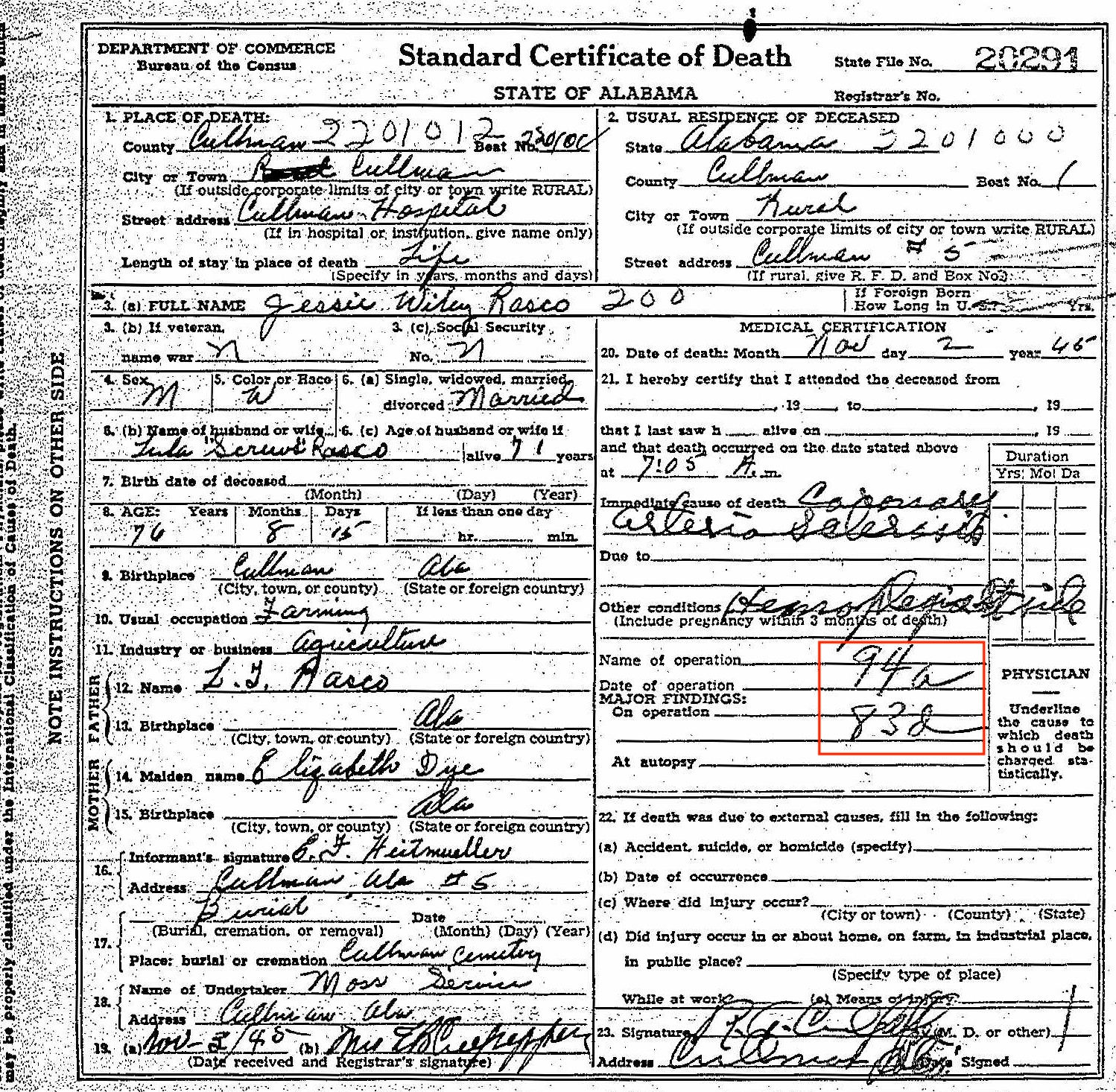
Death certificate for Jesse Wiley Rasco


As you can see, the ICD code for the primary cause of death is 94a. And the ICD code for the secondary cause of death is 83d. I could read the words for the primary cause of death. To me, it looks like Coronary Arteriosclerosis. Ordinarily, I would have stopped there. But the secondary cause of death was hard to decipher and I was curious.

I went to the International Classification of Disease page at Wolfbane.com and clicked on ILCD Revision 5 (1938), which would have been the version in use in 1945, since the next revision came out in 1948. The codes are listed in numerical order, so it was easy for me to find 94a, “diseases of the coronary arteries.” The secondary cause of death, 83d, is “hemiplegia and other paralyses of unstated origin.” Once I read that, I could see the word hemiplegia in the handwriting. It’s hard to make out the word after, but it looks to me like it could be “stroke.” I looked up the word hemiplegia and learned that it means “Paralysis on one side of the body.” [Edited to add: I received a note from reader Dennis Young suggesting that the handwriting says “Rt. side.” That makes complete sense and now seems obvious! The plot thickened a little when I received a note from reader Brad Pierce suggesting that the words say Lt. side, not Rt. side. Brad’s a physician himself so is probably good at deciphering doctor’s handwriting! I can’t tell whether it’s left or right, but I’m so glad to accept the “side” part. Thank you Dennis and Brad!]

Knowing that this 76-year-old farmer was living with paralysis on one side of his body at the time of his death gives me a bigger picture of what his life experience (or least the end of his life) was like.

As you can see, taking time to look up ICD codes when you see them might provide you with more information about your ancestor or might even solve a mystery. Just be sure you’re looking at the pertinent Revision!
Filed Under: Challenges, Genealogy tips Tagged With: genealogy tools, rasco, research, vital records

MyHeritage offering free photo colorization

April 22, 2020 By Janine Adams 13 Comments

When I was at RootsTech, MyHeritage had a booth where they were colorizing old black-and-white photos for people. The booth was always swamped with people. I wasn’t one of the people who stood in line for this service because the whole idea of colorizing old photos just didn’t sit right with me. I couldn’t put my finger on my objection, exactly. But I’m curious what readers of this blog think.

Today, I thought I’d blog about it, so decided to upload a couple of photos to try it out for a spin.

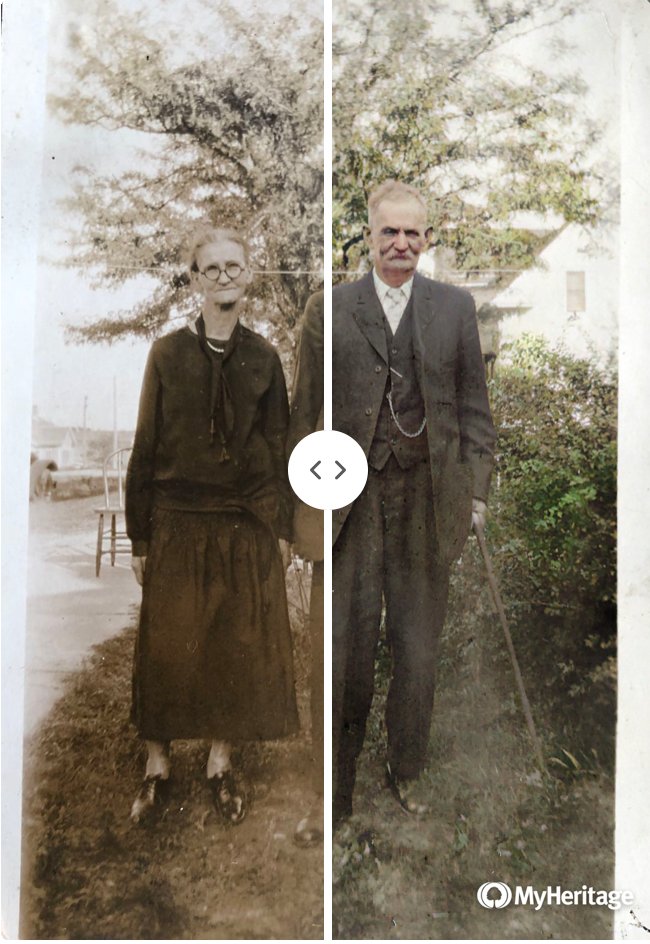
At left (at the top of this post) is a photo of my 2nd great grandparents, Samuel Vorce Wheeler (1852-1937) and Elizabeth Jane (Jennie) Nebergall Wheeler (1857-1933), taken in 1926 on the occasion of their 50th wedding anniversary. MyHeritage allows you to see your colorized and original photos side by side in one photo. You can move the dividing line back and forth and watch the photo change. That happens at the MyHeritage website–for the purposes of this post I took a screenshot. The photos you download (like those below) do not have the divider.

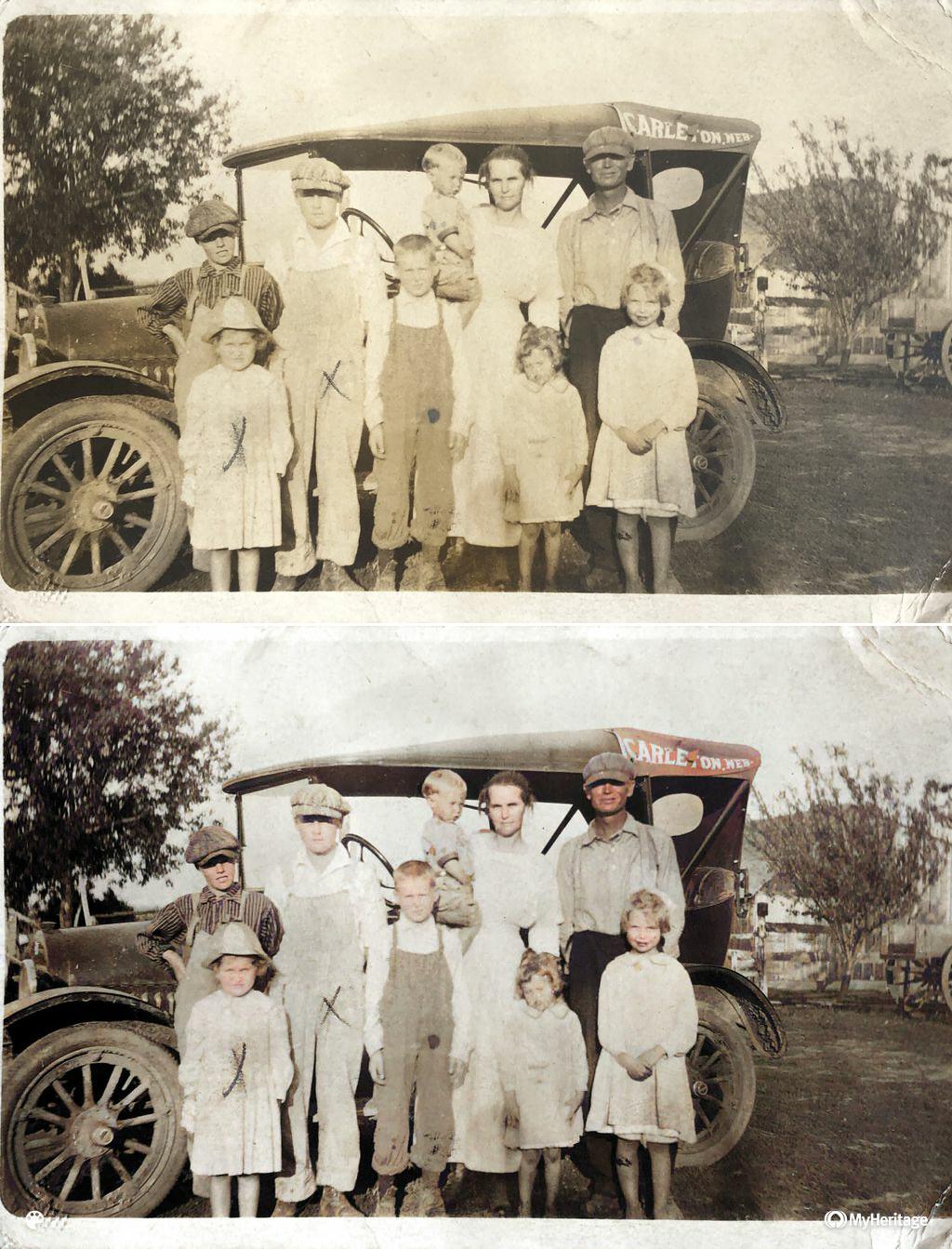
Here’s a photo of the Arthur Brown-Rhoda Wheeler family. (Rhoda is the daughter of Samuel and Jennie.) That’s my grandfather, Crawford Brown (1906-1996), on the far left with the dark striped shirt. I think the photo was taken around 1916. The top photo is the original that I uploaded. (I took a photo of the print with my phone, transferred it to my computer, and uploaded it.) Beneath is the colorized version.

I have to admit I find the colorized version more eye-catching. But it doesn’t feel like a 1916 photo, does it?

It’s incredibly simple to upload the photo to the MyHeritage site (just drag and drop). The colorizing takes seconds. There’s no charge. With a click, you can download the colorized version and/or a comparison photo that contains both images.

It’s amazing, but I’m still not sure quite what to think about it. I do know that I’m not going to include the colorized versions among my genealogy documents–they’re purely for fun.

Have you tried it? What are your thoughts?

Filed Under: Genealogy tips, Preservation, Reflections, Technology Tagged With: Brown, family photos, genealogy tools, technology

Hiring a professional genealogist

March 10, 2020 By Janine Adams 4 Comments

Every now and then I hear from someone who is interested in hiring a professional genealogist. I’m not one (though I do offer professional genealogy-organizing services) and I usually point those inquirers to the Association of Professional Genealogists (APG) to find a genealogy consultant. I definitely stand by that method.

At RootsTech, I became aware of another way to approach finding a professional genealogist: Trace.com. They’re middle men between professional genealogists and and people who need those services. (According to their FAQ page, they started as AncestorCloud, then acquired Genealogists.com and then created Trace.com)

If you have a need for a genealogist, you pay a deposit to Trace and describe your research question. The folks at Trace flesh out the question to create a project. They then contact researchers in their network of 4,000 researchers in 90 countries (who are contractors, not employees) and request proposals. They screen the proposals before sending them to you. You select one of the proposals and Trace manages the project. The company says they are “on a mission to make genealogy research accessible and affordable.” As someone who is easily overwhelmed by choices, I can see how their service would make hiring a genealogist feel easier.

At RootsTech, I had a chance to try them out. Trace was offering free 30-minute coaching sessions with their genealogists. I signed up in advance of the conference was asked to present a research question. I decided to ask for help tracing the whereabouts of my second great grandfather, George Washington Adams, between the time his second wife left him in 1919 (according to divorce papers) and his entry into the Old Soldiers Home in 1922. I have not been able to find him on the 1920 census and it’s been driving me crazy.

My genealogist, Aimee, was not able to answer the question (nor would I expect her to in 30 minutes) but she did give me some avenues for exploration that I hadn’t thought of. It was definitely time well spent. And it gave me a little taste of the service. I quizzed Aimee a bit about Trace and learned that she was very happy working with them.

If you’re interested in hiring a professional genealogist, you might look into Trace as well as consulting the APG website.


Filed Under: Challenges, Genealogy tips Tagged With: genealogy tools, professional genealogist

My “good enough” research log

January 10, 2020 By Janine Adams 8 Comments

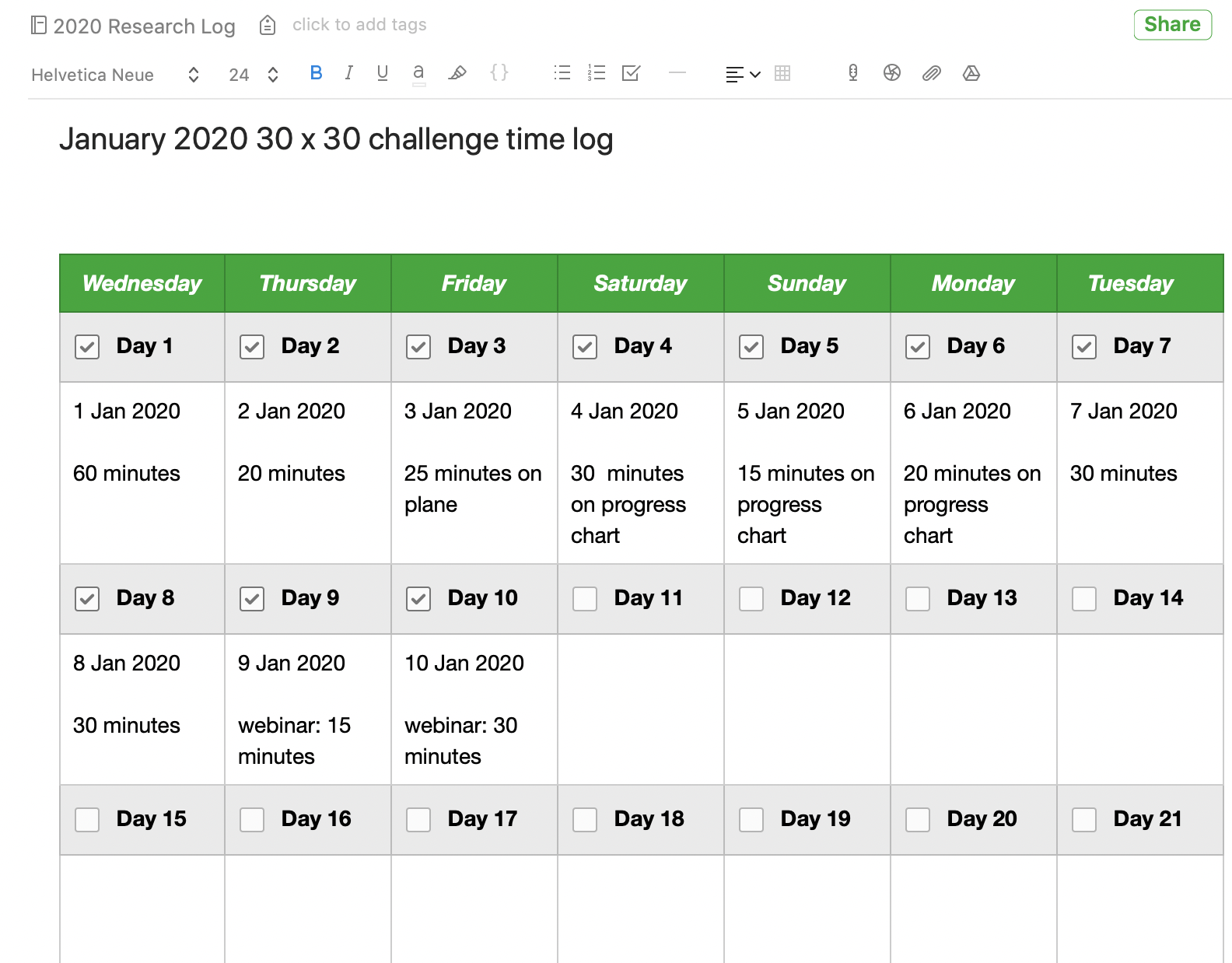
My good enough research logWe’re in the midst of a 30 x 30 challenge this month so I’ve been researching every day. It feels great. I have no more than 30 minutes (sometimes less) to research most days this month, so I rely on my research log to help me start each session.

I’ve blogged before about my research log and its value. This month, because I’m working on my RootsTech talk “The Imperfection Genealogist,” I’ve been reflecting on the fact that my very informal research log is far from perfect. But it’s certainly good enough.

How do I know it’s good enough? It’s because I’m in touch with why I want to keep a research log and the ways I use it. For me, it’s about knowing what I’ve researched in a given session and (perhaps more importantly) what my next steps are. It also tells me at a glance how frequently I’m researching. I keep my research log in Evernote, but I track of all my documents and family tree elsewhere, so I’m not creating source citations or storing documents in my research log. You might have a research log for different reasons. And yours may be very different from mine. And that’s great.

My good-enough research log is an Evernote notebook by year (I started the 2020 research log notebooks ten days ago), pinned as a shortcut in the sidebar. Each time I research, I open the notebook, create a new note with today’s date, and then write in free from what I worked on that day. I write down the questions that come up. I write down any discoveries. And I end the session by writing down the next steps. That way, when I start the next session, whether it’s the next day or the next month, I know where to start. That’s been a huge time saver for me. (I blogged in more detail about my research log in this post. About a year ago, I wrote a post about how my research log keeps me focused.)

This month, I’ve added an Evernote template that allows me to check off that I completed a session and I also add how many minutes I researched, because I’m hoping that I’ll get in 900 minutes in the 30 x 30 challenge, even if I don’t manage 30 minutes in some individual sessions. This is motivating to me, because when I see the checkmarks each day it makes me want to not break the chain. I also jot down in a couple of words what type of work I did. The picture at the top of this post is screenshot of the note that contains the template, which is in addition to my usual daily note but also stored in the 2020 research log notebook. (To get that template, I clicked on New Note, then on Template right in the note, then Habit Tracker in the Template Gallery. That inserted the template into the note and I edited it a bit.)

When I first started contemplating creating a research log in 2012, I could understand its value but I got wrapped up in trying to do it perfectly. Predictably, my first attempts failed. But as soon as I got in touch with what I really wanted out a research log and I made it easy to accomplish, things fell into place. Now, I’m glad to say that I’ve developed a habit of logging my session every day.

A couple of years ago, I created a Facebook group called Genealogy Research Loggers. We’re a pretty quiet group, but if you’d like some help and accountability for creating a research log habit, please join us!

For detailed information on how I organize my own genealogy research (including my research log), check out my Orderly Roots Guide, How I Do It: A Professional Organizer’s Genealogy Workflow, available for $19.99.

Filed Under: Challenges, Organizing Tagged With: Evernote, genealogy tools, research, research log

  • « Go to Previous Page
  • Page 1
  • Interim pages omitted …
  • Page 5
  • Page 6
  • Page 7
  • Page 8
  • Page 9
  • Interim pages omitted …
  • Page 30
  • Go to Next Page »

about me

I'm Janine Adams, a professional organizer and a genealogy enthusiast. I love doing family history research, but I find it's very easy for me to get overwhelmed and not know where to turn next. So I'm working hard to stay organized and feel in control as I grow my family tree.

In this blog, I share my discoveries and explorations, along with my organizing challenges (and solutions). I hope by sharing what I learn along the way I'll be able to help you stay focused and have fun while you do your research, too.

tags

30 x 30 Adams amy johnson crow anniversary Brown cemetery census Civil War conferences connections dna electronic files Evernote excitement Family Curator family photos genealogy tools getting started goals How They Do It Igleheart Jeffries keepsakes learning opportunities maps newspapers NGS organizing aids overwhelm paper files planning quick tips rasco record keeping research research log research trip resources RootsTech social history source documentation Stacy Julian technology time management vital records

join the facebook community!

join the facebook community!

My organizing business

Learn more about my organizing business, Peace of Mind Organizing®.

Subscribe by RSS

  • RSS - Posts
  • RSS - Comments

© 2026 Janine Adams


Loading Comments...