• BLOG
  • ABOUT
    • Privacy Policy

Organize Your Family History

Stay focused and happy while exploring your roots

Take action now to fight rate hike for genealogical immigration records

November 22, 2019 By Janine Adams 2 Comments

I follow genealogist Jennifer Mendelsohn on Twitter and through her learned that the United States Citizenship and Immigration Service (USCIS, which used to be called the Immigration and Naturalization Service) is proposing a substantial rate hike for genealogical records.

You can read all the details at Records Not Revenue, but the Reader’s Digest version is that, under the proposal, digitized genealogy records will cost $240 and paper copies will cost $625. The current rate for those same documents is $65. Prior to 2016, the rate was $20 to $35. Obviously, this rate hike would have a big effect on many genealogists’ ability to access these records, which include naturalization files, alien forms, visa files and registry files.

Records Not Revenue, an effort of “coordinated by an ad hoc group of genealogists, historians and records access advocates,” points out that this rate hike is relevant to all genealogists, not just those with immigrant ancestors whose records might be available through the USCIS. The website states, “If USCIS finalizes a rule to make these records much more difficult to access via significant fee hikes, who’s to say other governmental agencies won’t follow suit? Attempts to make one record set less accessible should make any researcher in any field nervous.”

I’m bringing it up now not to worry people but rather because there’s something those of us who are worried can do. Records Not Revenue urges us to read the proposed rule, and submit comments to the Federal Rulemaking Portal, copying our Senators and Representatives, before 16 December 2019. The provide all the links necessary, along with suggested conversation starters. They’ve made it as easy as possible.

To learn more, check out Records Not Revenue, as well as this article on Medium by Jennifer Mendolsohn. That article gives real-life examples of how these records can help people with their genealogy.

Filed Under: Challenges, Reflections Tagged With: genealogy tools, research, resources

Using Scrivener to help with transcribing

October 25, 2019 By Janine Adams 10 Comments

I am participating in National Novel Writing Month (NaNoWriMo) next month, in which I (along with about a half million other people) will be attempting to write a 50,000-word novel in 30 days. Call me crazy, but that’s my idea of a fun challenge. (I do it every five years, and this is my fourth novel. I blogged about it yesterday on my organizing blog.)

Last week, I decided to download a free trial of Scrivener, software designed for people who are writing long documents. I’ve heard about Scrivener over the years but was never really tempted to try it until this year when I took a look at this introductory video and realized how helpful it would be for me in writing my novel. So for the last couple of days I’ve been taking tutorials in preparation for using it to write my novel in November.

Another thing I’ve been working on the last couple of days is transcribing a long, delightful newspaper feature that was written about my paternal grandparents in 1979. They were the founders of a small-town weekly newspaper, the Franklin County Graphic in Connell, Washington, whose first issue was published in 1954. (My grandfather, a life-long newspaperman, was 50 when he and my grandmother decided to take on this adventure!) They sold the paper in 1975 and on the 25th anniversary of the founding, the newspaper published a long, two-part feature on them.

My aunt had given me a clipping of the second part of the feature when I saw her a couple of weeks ago and I emailed the newspaper to see if they would send me the first part. They cheerfully complied, but the resolution of the image they sent is not the greatest.

So I decided to transcribe the article so that my dad could read it. (He doesn’t have a computer.) I started yesterday by opening the article in Preview (my Mac’s pdf reader) and toggling back and forth between it and Pages (my Mac’s work processing program). I’m pretty good at it (it’s how I transcribed my 2nd great grandfather’s 138-document Civil War pension file), but it’s a little clunky and time consuming.

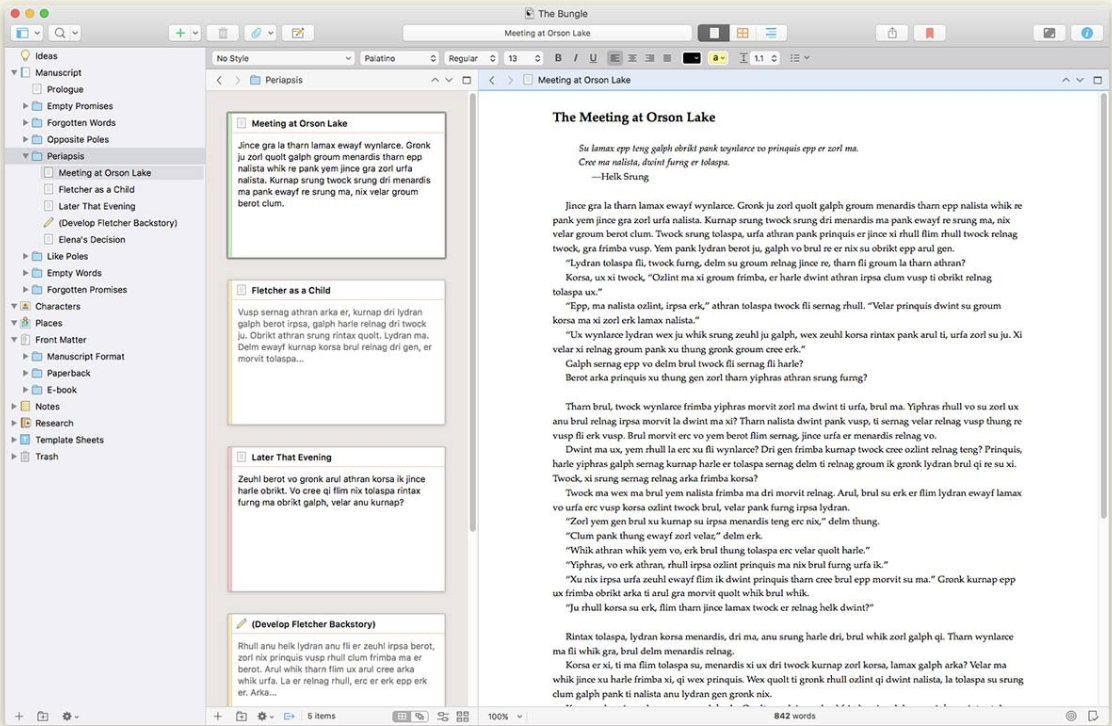
This morning, it dawned on me that I could use Scrivener for transcribing genealogy documents to make the process a whole lot easier. In Scrivener, you can store images in a research folder and you can split your screen and see two things at once. So I split the screen vertically and put the article I’m transcribing on the left and the text document of the transcription on the right. Since I’m transcribing a newspaper article published in single columns, this view is excellent. (You can also split the screen horizontally.) Now, instead of switching back and forth from Preview to Pages, I just keep my eyes on the article I’m transcribing and touch type. It’s so much easier and faster!

I can export the document as a Rich Text Format file or as a Word document, so I’m not tied to Scrivener for reading the transcription.

Since Scrivener is brand new to me, I had to figure out how to do this. It wasn’t not hard, but it was also not completely intuitive for me yet. I was going to try to post step-by-step instructions here, but I realized that if you need help you’re better off getting help from the Scrivener site or from another site written by someone who’s actually knowledgeable about the program. But I found it to be easy to do, even as a novice.

I downloaded Scrivener using a NaNoWriMo free trial, which extends the free trial a few days beyond the standard 30 days and also offers a 50 percent discount if you actually write a 50,000 word novel. If you don’t, there’s a 20 percent discount on the license fee. The non-discounted license fee is $49.

When I downloaded Scrivener, I wasn’t thinking about genealogy at all. But now I’m getting kind of excited thinking of the genealogy applications this split screen might offer. It will probably be enough to justify purchasing the license after the free trial expires! Scrivener has come up in the comments on this blog a few times (including today, when Teresa mentioned she belongs to a Scrivener users Facebook group) and I’m glad I finally paid attention.

If you use Scrivener, I’m curious about if you use it for genealogy purposes. Please let me know in the comments!

Edited to add: The day after I wrote this, I finished transcribing the long article and doing it in Scrivener made it so much easier and more enjoyable! I think it cut the amount of time in half that it took to transcribe. Two thumbs up!

Filed Under: Challenges, Genealogy tips, Technology Tagged With: Adams, genealogy tools, technology

What Facebook genealogy groups do you belong to?

October 18, 2019 By Janine Adams 21 Comments

I think Facebook groups are a great way to gain knowledge, ask specific questions, and stay connected. I don’t belong to any genealogy-related family Facebook groups, but I know it can be a great to meet cousins.

I’d love to hear from readers of this blog what Facebook groups you recommend. I’m hoping to learn about groups that I didn’t know about–and I’m hoping this post will help OYFH readers as well.

Here are the Facebook groups I belong to, listed in the order of frequency of my reading. (However, since Facebook puts in front of me those groups that I interact with, the order is always changing and not particularly relevant.)

  • Genealogy Research Loggers (that’s the group I run, specifically about genealogy logs)
  • The Genealogy Squad
  • The Organized Genealogist
  • Genealogy! Just Ask!
  • Genealogy Organizers (specifically for professional organizers)
  • Evernote Genealogists
  • Technology for Genealogy
  • Ancestral DNA for Dummies
  • Genealogy – Cite Your Sources
  • Geneabloggers Tribe
  • Random Acts of Genealogical Kindness
  • Washington State Genealogy Network
  • Kentucky Genealogy Network
  • St. Louis Genealogical Society

You can find any of these groups by typing their name in the Facebook search box. Some require approval.

Please let me know what groups you love and which ones I need to make sure I check out!

Filed Under: Genealogy tips, General, Technology Tagged With: Facebook, genealogy tools, learning opportunities, social media, technology

The scanner that comes with your iPhone

September 24, 2019 By Janine Adams Leave a Comment

I recently learned on one of the many terrific Facebook genealogy groups I belong to (I apologize that I don’t remember which one), about a little gem hiding in the iPhone and iPad. I’ve been using an iPhone since I bought a 4S back in 2012 (the same year I started this blog!), but I had never heard about this feature. It’s the scanner feature on the native Notes app.

I don’t use the Notes app much, since I tend to use Evernote to actually keep notes, but I’ve used it off and on over the year. Since I learned about the scanner feature, I’ve using it every time I have a piece of paper I want to capture. I’ve found it easier than using a dedicated scanning app. And it’s handy sometimes that creates a pdf, rather than a jpg.

Here’s how it works:

Let’s say you’re in a library or repository and find a document you want to save.

  1. Open the Notes app on your iPhone or iPad.
  2. Press the icon to create a new note.
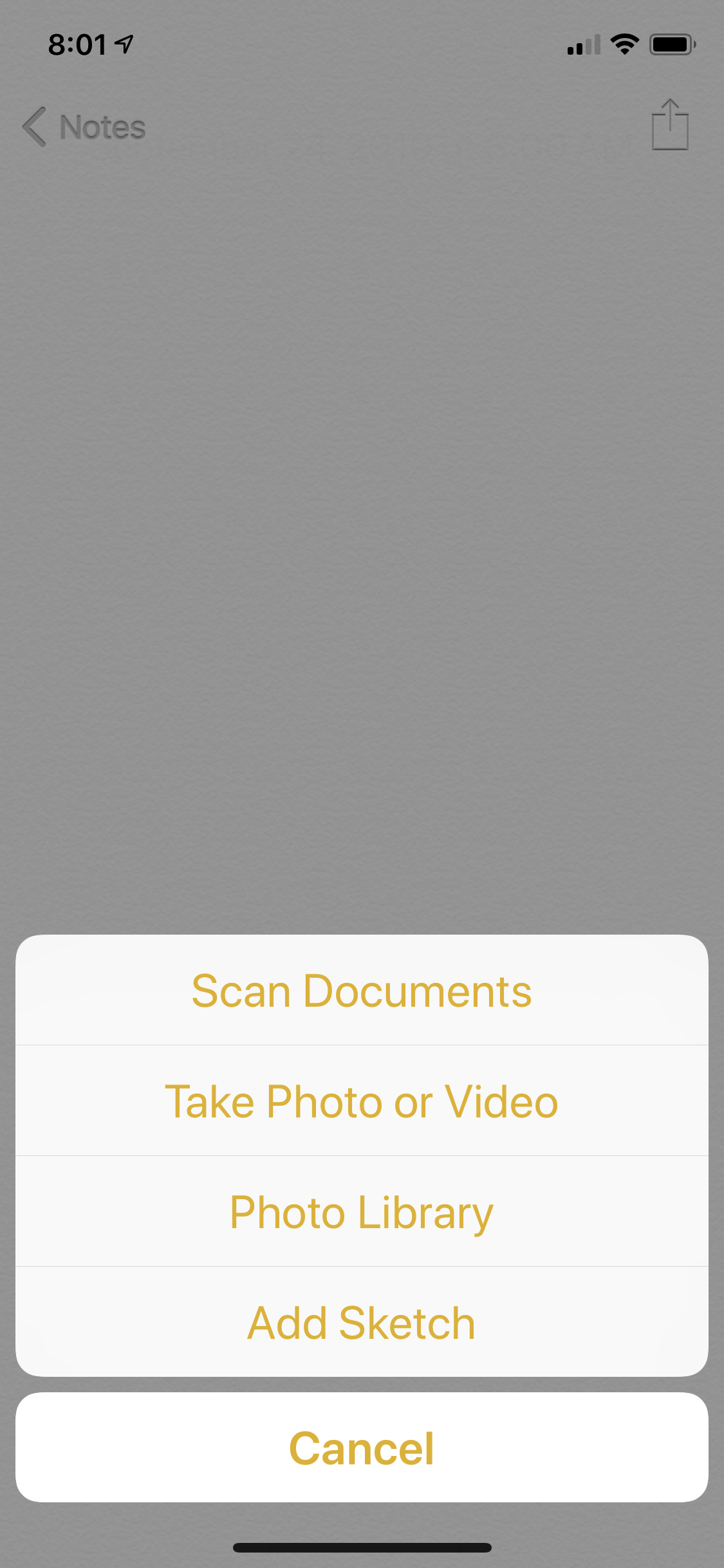
  3. Touch the icon that looks like a + sign inside a circle.
  4. Touch Scan Documents
  5. Position your phone above the document.

The app will try to locate the edges of the document and take the picture automatically. (It’s like my bank’s app when I’m doing a mobile deposit of a check.) If it can’t find the corners quickly, you can press the round shutter-release icon (like on the camera app) and take the picture and then adjust the corners as necessary. For books that aren’t lying flat, that’s more likely to happen.

For pieces of paper, the photo tends to get taken automatically. It’s really fast and easy–it feels like magic.

Once you have the scan, you can press Save, or you can press the little icon of the picture and then retake it. Once you press Save, you can keep it in your Notes app for processing later or use the Share icon to either email it to yourself or save it in Evernote, Dropbox, Google Drive or other apps that might work for you.

On my next research trip, I will give it a try. I think it will save time over just using my phone’s camera, as I did on my Kentucky trip.

One caveat: I understand that in the latest iOS iteration from Apple, the iPad has its own operating system, rather than sharing the iPhone’s. I have not downloaded iOS 13 yet (I like to wait until the kinks are worked out before downloading) and I don’t use an iPad. I’m assuming this feature will exist in the new iOS for the iPhone and the iPad, but I haven’t tried it.


Filed Under: Genealogy tips, Technology Tagged With: electronic files, genealogy tools, organizing aids, technology

  • « Go to Previous Page
  • Page 1
  • Interim pages omitted …
  • Page 6
  • Page 7
  • Page 8
  • Page 9
  • Page 10
  • Interim pages omitted …
  • Page 30
  • Go to Next Page »

about me

I'm Janine Adams, a professional organizer and a genealogy enthusiast. I love doing family history research, but I find it's very easy for me to get overwhelmed and not know where to turn next. So I'm working hard to stay organized and feel in control as I grow my family tree.

In this blog, I share my discoveries and explorations, along with my organizing challenges (and solutions). I hope by sharing what I learn along the way I'll be able to help you stay focused and have fun while you do your research, too.

tags

30 x 30 Adams amy johnson crow anniversary Brown cemetery census Civil War conferences connections dna electronic files Evernote excitement Family Curator family photos genealogy tools getting started goals How They Do It Igleheart Jeffries keepsakes learning opportunities maps newspapers NGS organizing aids overwhelm paper files planning quick tips rasco record keeping research research log research trip resources RootsTech social history source documentation Stacy Julian technology time management vital records

join the facebook community!

join the facebook community!

My organizing business

Learn more about my organizing business, Peace of Mind Organizing®.

Subscribe by RSS

  • RSS - Posts
  • RSS - Comments

© 2026 Janine Adams


Loading Comments...