• BLOG
  • ABOUT
    • Privacy Policy

Organize Your Family History

Stay focused and happy while exploring your roots

Creating bio sketches of your ancestors

June 8, 2018 By Janine Adams 21 Comments

Reader (and professional genealogist) Maria Tello commented in my recent post on shifting my focus that she is in the process of creating biographical sketches for each of her ancestors, so that she can pass information on to her children and grandchildren, who are not genealogists.

I was intrigued by the idea and asked her to give me a little more information, along with an example.

Maria wanted to make her research more easily understood by her children and grandchildren, she is writing these short sketches of each ancestor. Her research on some of her lines goes back to the 15th century, so it’s a big task!

I’m thoroughly impressed that Maria’s goal is to write one of these each day. I think that’s a wonderful way to make an overwhelming project seem much more attainable.

Maria said that she used the Register Style Template from the New England Historic Genealogical Society as the basis for her sketches. I love that sources and footnotes are a prominent part of the template.

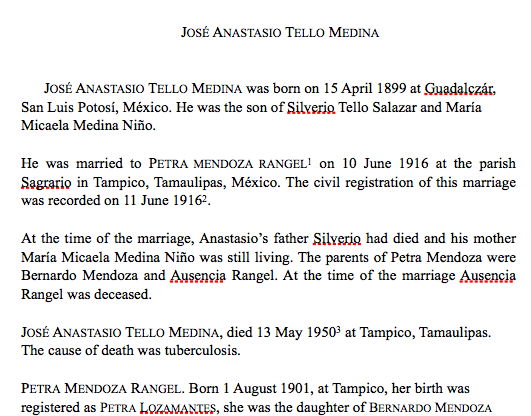
Here’s a sample sketch, of one of Maria’s ancestors on her father’s side. She explains, “My accreditation is in Mexico and the bulk of my research is done in Spanish language areas. I used tools that were developed for New England colonial area research, however, and that works splendidly.”

Click on this link to read Maria’s sketch of José Anastasio Tello.

Maria reports that her children not only have found the sketches easy to understand but they’re actually grateful for them!

In addition to the obvious benefit of having an easily understood way to present genealogical information to those who follow you, I can see how useful this exercise is to find holes in your research. I can also see its benefits for reacquainting yourself with your ancestors.

Reunion, the genealogy software I use, will create these reports automatically, I discovered. But Maria and I discussed the benefits to doing them by hand. There’s a big difference between creating something and reading something. (This is part of a larger post I’m contemplating on manual versus automatic in genealogy–keep an eye out.)

As I look toward shifting to a different family line in my own research, I think I’m going to take the time to write a bio sketch for the main ancestor I’ve been researching, George Washington Adams (1845-1938) before I say goodby to him for a little while. I think it should be a fun exercise.

Maria, thank you so much for sharing what you’re doing! And best of luck completing all the profiles!
 

Filed Under: Challenges, Genealogy tips, Preservation Tagged With: genealogy tools, Maria Tello, record keeping

A time-saving addition to my digital workflow

May 11, 2018 By Janine Adams 12 Comments

I’ve posted before about how I process documents that I download from online sources. In an ideal world, I follow my workflow from start to finish as soon as I download a document. But in the real world, it’s not unusual for me to run out of time to process the document immediately. (By “process” I mean, create a source, extract facts, add those facts to my genealogy software and properly file the document on my hard drive). That’s an inevitable outcome in researching in short, frequent sessions, as I do.

When I download a document, without fail I rename the file using my file-naming protocol (Year Document Type-Ancestor Name-Location) and file it in my Surnames folder. But all too often I don’t have time to properly process it and the document languishes in the Surnames holding pen until I do have time.

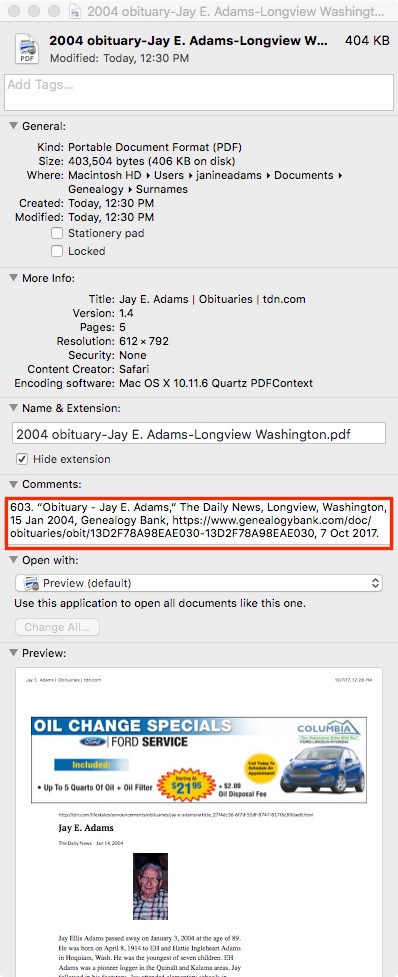
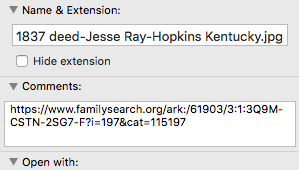
Today, I added a small item to my digital workflow. As soon as I download a document and rename it, I right-click on the file in my Mac’s Finder, select Get Info, then in the Comments section, I paste the URL of where I found the document. That way, if I need more information to create a source, it’s simple for me to get back to the online source. Per my workflow, once the source citation is created, I replace the URL in the Comments area with the citation itself (which includes the URL).

It’s a small thing, but I know this is going to save me time in finding the document online again. And it will reduce aggravation. Sometimes little things can make a big difference!

For more in-depth information on going digital with your genealogy research, check out The Paperless Genealogy Guide, a 44-page downloadable guide written by paperless expert Brooks Duncan and me and available for $9.

Filed Under: Challenges, Organizing, Technology Tagged With: electronic files, organizing aids, record keeping, source documentation

Keeping track of the FAN Club

March 24, 2018 By Janine Adams 16 Comments

I’ve heard over the years about researching our ancestors’ Family, Associates and Neighbors (or FAN Club or FAN Principle, a term credited to Elizabeth Shown Mills) as a way to learn more and get past brick walls. At RootsTech, I heard a terrific talk from Drew Smith on the topic. (Another term for the FAN principle is Cluster Research.)

When I came home and decided to spend some time doing FAN research, I was initially flummoxed by the question of how I would keep track of these people. I typically document all information about my ancestors in my desktop genealogy software. (I use Reunion.) Everyone in Reunion is related by blood or marriage and is connected on the tree. (I’m at the base of the tree.) But some of these FANs aren’t family, so it didn’t make sense to me to put them into Reunion.

I googled a little and didn’t come up with definitive advice, so I decided on an organizing system for FAN research that I think will work for me. In Evernote, in my Genealogy stack, I already have follow up notebooks for different family lines. This is a way to keep me focused so that I don’t pounce on every clue that I come across. So, for example, I have a notebook called Follow Up: McEuen and when I come across a research topic or clue for a McEuen, I put it there, in an individual note. At some point, I’ll refocus my efforts on the Follow Up notebooks and until then, all this information is safe in Evernote. It gives me peace of mind.

So I figured I could do the same with FANs. I can start a series of FAN: [Surname] notebooks and when I’m doing FAN research, I can create notes within each notebook about various associates and neighbors who seem significant. When I uncover evidence about my family that I want to record in Reunion, I’ll put it there (always with a source). But when I have FAN information that doesn’t make sense to add to Reunion, I’ll keep it in Evernote. Of course, I can also add associates and neighbors to the notes section in Reunion when appropriate. And Evernote allows me to create links to notes, which I can use in Reunion notes, if I want.

As I apply the FAN principle more, I’ll see if this simple method of keeping track of them will be sufficient. My overriding principle is to keep things as easy as possible.

Please share: how do you record information on your ancestors FANs?

Filed Under: Challenges, Genealogy tips, Organizing Tagged With: organizing aids, record keeping, research, research techniques

How I process a downloaded document

October 20, 2017 By Janine Adams 14 Comments

Last March, I wrote a post called My digital workflow that detailed what I do with a document I find on the Internet. (I never print it.) My digital workflow has not changed since then and it’s working out really well for me.

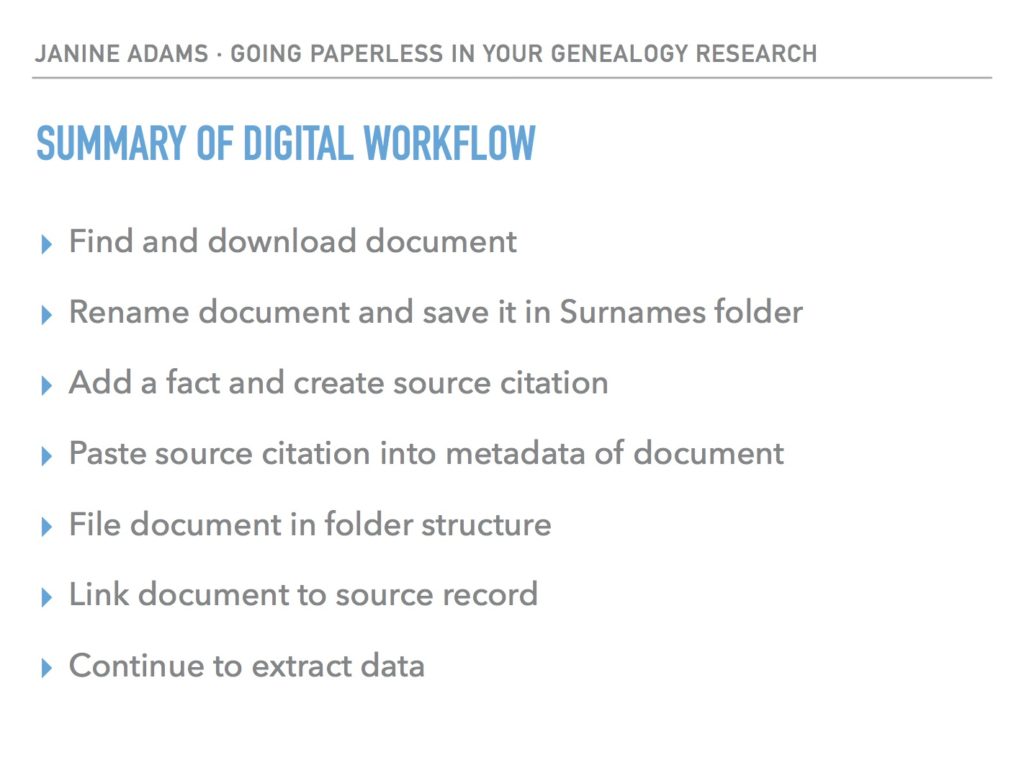
Last weekend, I did a talk at the St. Louis Genealogy Conference about going paperless and in my Powerpoint I included screenshots of the digital workflow and also a summary slide. The attendees asked for copies of the summary slide, so I decided to post it here.

The process is basically the same as my March post but I switched up the steps a little.

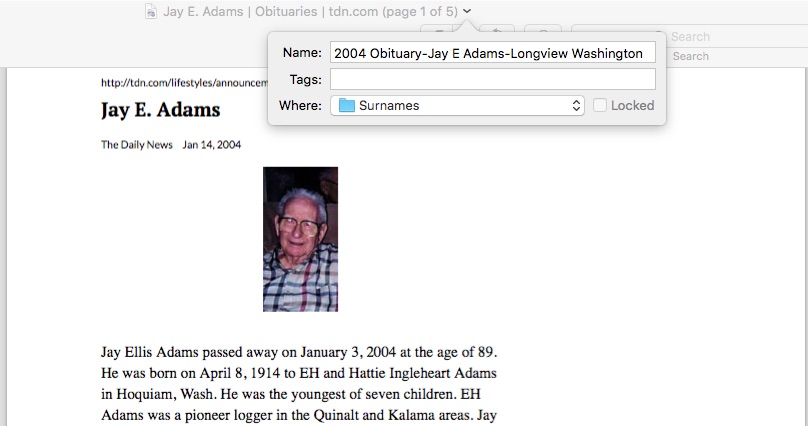
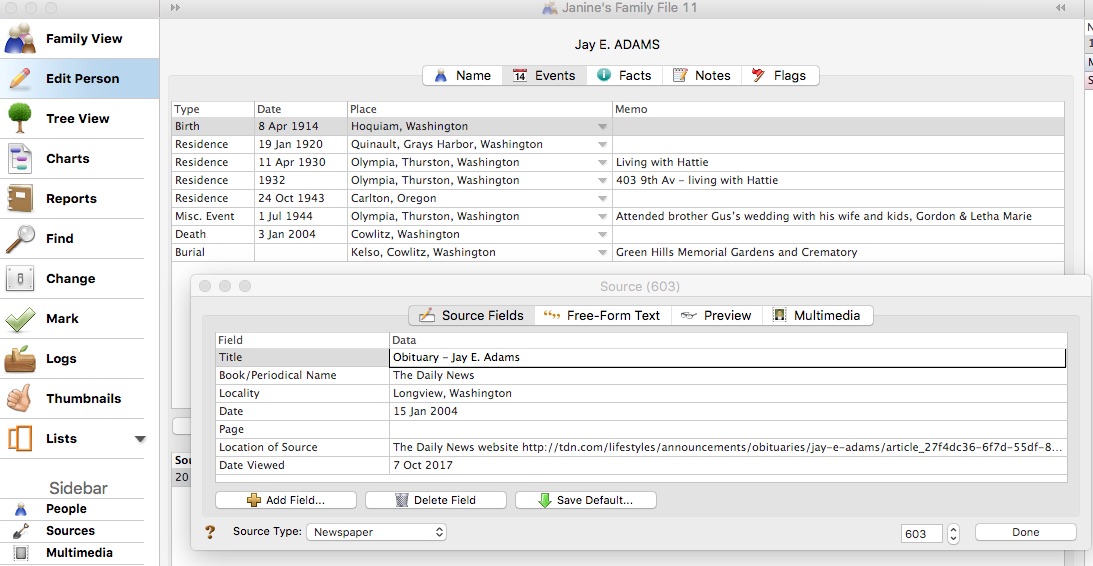
The example I used in my talk was my father’s uncle, Jay Ellis Adams (1914-2004). I had found his obituary online at the newspaper’s website. Here’s the workflow:

1. I click Print and, in the printer dialog box, Open in Preview (my Mac’s default pdf reader), which downloads the document to my computer. (If it had been a document at Ancestry, I would have clicked Save, then Save to My Computer.)

2. I immediately rename the file, using my file-naming protocol, which is Date Type of Document-Ancestor Name-Locality. I stick it into my Surnames folder, as a temporary holding place until I file it in step 6. I know that any unfiled documents in the Surnames folder require processing.


3. I select a fact from the document, add it to Reunion and create a source citation for it.


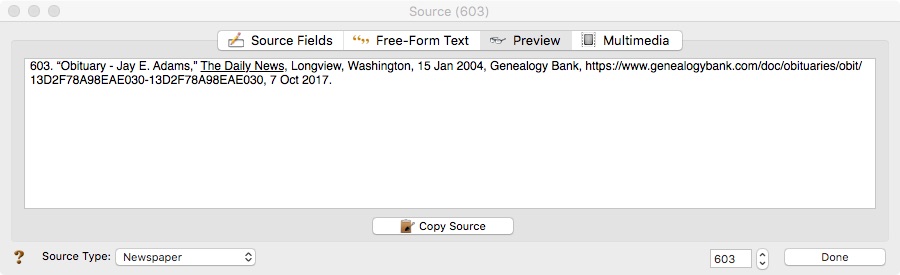
4. In Reunion, I click the Preview tab in the source record and then click Copy Source. (For the eagle-eyes among you, I originally found a transcript at Genealogy Bank and used that as the source citation. Then I decided to go to the newspaper’s website and download it from there, so I changed the source citation. But I was too lazy to take a new screenshot.)

5. I paste the source citation into the metadata of the source document (the obituary) by Ctrl-clicking on the file and selecting Get Info from the menu that appears, then pasting into the Comments area.


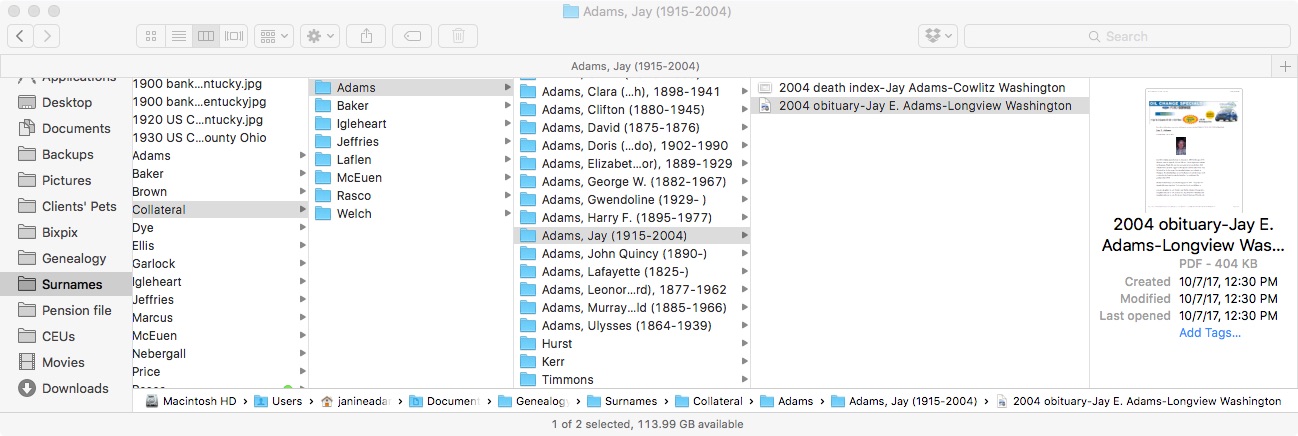
6. Then I file the document into my folder structure. My folder structure for collateral relatives is Genealogy/Surnames/Collateral/[Surname]/[Name of Ancestor (YOB-YOD)]. If the document  applies to multiple people, I duplicate it for each person and then drag it into the appropriate folder for each person. But I don’t take the trouble to rename it.

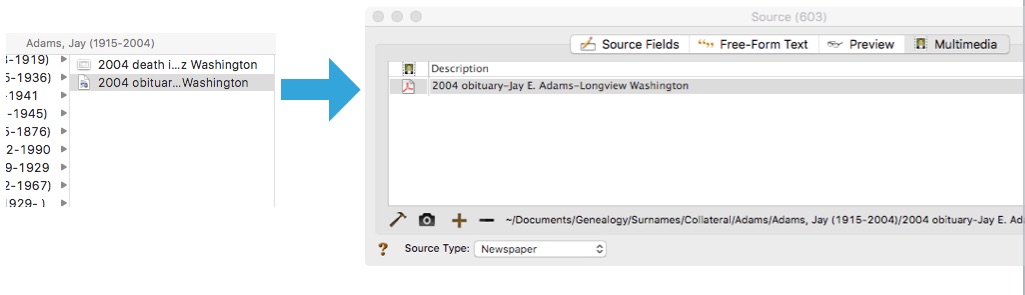
7. The final step is to drag the document into the Multimedia area of the source record in Reunion. This creates a link to the document so that I can open it up inside Reunion, which is very handy.


From there, I continue to extract information from the source document and add that it to Reunion. Every piece of information I glean from a single source document uses the same source number, no matter what person it applies to.

Here’s the summary slide:

This is the way I do and it works well for me. Of course, it’s not the only way to do it or perhaps the best way to do it. But I’m hoping you’ll find it useful to see my workflow. I’ve been processing documents this way for almost a year now and it’s working very well.

For more in-depth information on how I organize my own genealogy, check out How I Do It: A Professional Organizer’s Genealogy Workflow, a 37-page downloadable pdf available for $19.99.

Filed Under: Challenges, My family, Organizing, Technology Tagged With: Adams, electronic files, organizing aids, record keeping, source documentation

  • « Go to Previous Page
  • Page 1
  • Interim pages omitted …
  • Page 5
  • Page 6
  • Page 7
  • Page 8
  • Page 9
  • Interim pages omitted …
  • Page 15
  • Go to Next Page »

about me

I'm Janine Adams, a professional organizer and a genealogy enthusiast. I love doing family history research, but I find it's very easy for me to get overwhelmed and not know where to turn next. So I'm working hard to stay organized and feel in control as I grow my family tree.

In this blog, I share my discoveries and explorations, along with my organizing challenges (and solutions). I hope by sharing what I learn along the way I'll be able to help you stay focused and have fun while you do your research, too.

tags

30 x 30 Adams amy johnson crow anniversary Brown cemetery census Civil War conferences connections dna electronic files Evernote excitement Family Curator family photos genealogy tools getting started goals How They Do It Igleheart Jeffries keepsakes learning opportunities maps newspapers NGS organizing aids overwhelm paper files planning quick tips rasco record keeping research research log research trip resources RootsTech social history source documentation Stacy Julian technology time management vital records

join the facebook community!

join the facebook community!

My organizing business

Learn more about my organizing business, Peace of Mind Organizing®.

Subscribe by RSS

  • RSS - Posts
  • RSS - Comments

© 2026 Janine Adams


Loading Comments...