• BLOG
  • ABOUT
    • Privacy Policy

Organize Your Family History

Stay focused and happy while exploring your roots

My progress-tracking spreadsheet

August 31, 2025 By Janine Adams 16 Comments

I wrote this post, which is one of the most-read posts on this blog (more than 31,000 views!), way back in 2013. It got a great response, so I thought I’d run it again for newer readers. For me, being able to see at glance which documents I’ve found (or need to find) for my ancestors has been really helpful. I hope you find the post useful!

My memory is not what it used to be. And I’m finding the more family history research I do, the more I’m duplicating effort. In the process of researching one person, another person will pop into my mind. I’ll look for a record for that person, rejoice in finding it, then realize I’d already found it!

So in an effort to avoid that, as well help me in my never-ending quest to not feel overwhelmed about my genealogy research, this past weekend I created a series of progress-tracking spreadsheets. I was inspired by Miriam’s Census Spreadsheet, which is a Google Doc. I’m a Mac user and I used the Numbers program (similar to Excel) to create three spreadsheets (so far) that track progress, by ancestor, on finding the following records:

Sheet 1: BMD

  1. birth records
  2. marriage records
  3. death records
  4. burial records
  5. grave photos

Sheet 2: Censuses

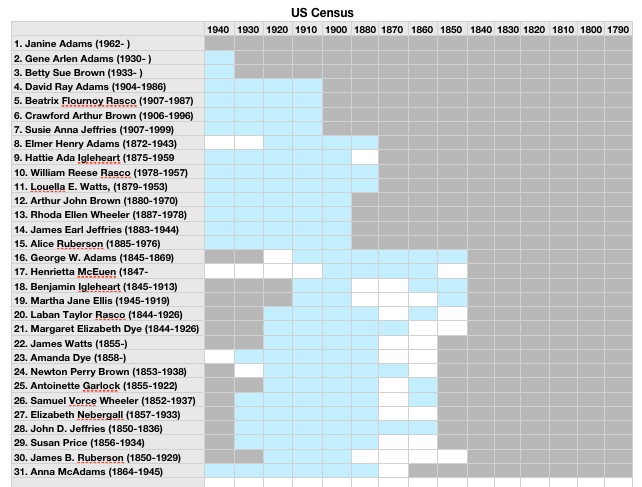
On the first table (pictured above) I have a row for each ancestor (this is a work in progress…I’ve been adding info a generation at a time and up to my great-great grandparents), and a column for each U.S. Census. I fill in the square in blue if that record was found. A grey square indicates the ancestor wasn’t alive for that census. A blank (white) square indicates I still need to find this record. I also have a table of state censuses, so I can note those.

Sheet 3: Military

Here I track what military records I’ve found for each ancestor, by war or conflict. This one’s definitely a work in progress.

Going through this process helped me realize how much census work I’d done and how much more work I had to do to find birth, marriage and death records. I think these charts will help me feel a sense of accomplishment and also help me hone in on work that needs to be done. I’ll keep adding ancestors from Reunion, until I’m caught up, and then plan to keep up with the spreadsheet as I find more records.
Filed Under: My family, Organizing Tagged With: organizing aids, overwhelm, planning, progress log, research, research log, resources

My good enough research log is good enough

October 18, 2024 By Janine Adams 6 Comments

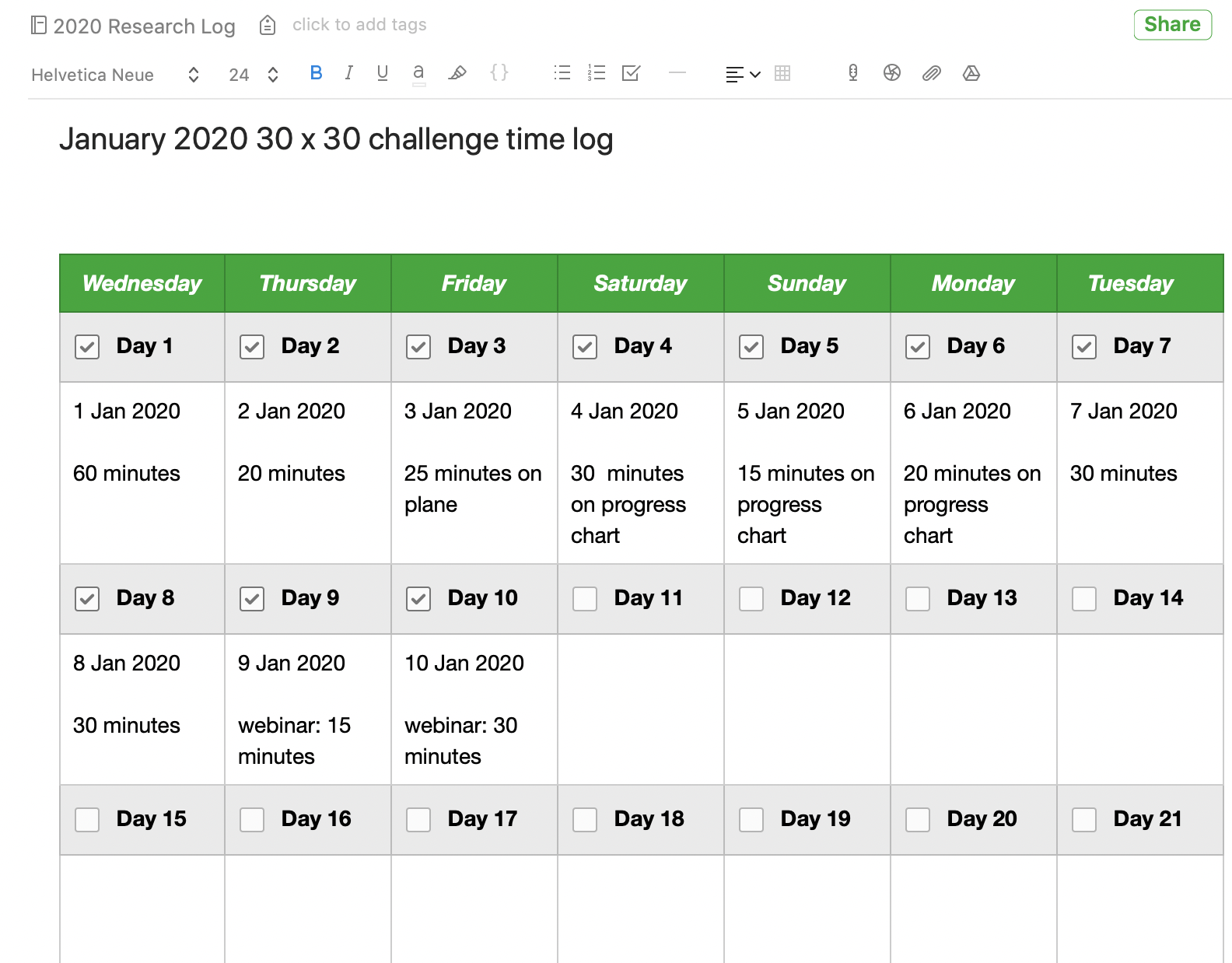
My good enough research logI wrote this post back in January of 2020. This informal logging method has stood the test of time for me. I’m still using it though I’ve moved from Evernote to Apple Notes. It’s not good enough for a professional genealogist but for my hobbyist self it keeps me on track, which is my top priority. I thought I’d repeat the post today. (The Evernote template pictured lasted exactly one month; I don’t use it any longer even during 30 x 30 challenges.)

We’re in the midst of a 30 x 30 challenge this month so I’ve been researching every day. It feels great. I have no more than 30 minutes (sometimes less) to research most days this month, so I rely on my research log to help me start each session.

I’ve blogged before about my research log and its value. This month, because I’m working on my RootsTech talk “The Imperfection Genealogist,” I’ve been reflecting on the fact that my very informal research log is far from perfect. But it’s certainly good enough.

How do I know it’s good enough? It’s because I’m in touch with why I want to keep a research log and the ways I use it. For me, it’s about knowing what I’ve researched in a given session and (perhaps more importantly) what my next steps are. It also tells me at a glance how frequently I’m researching. I keep my research log in Evernote, but I track of all my documents and family tree elsewhere, so I’m not creating source citations or storing documents in my research log. You might have a research log for different reasons. And yours may be very different from mine. And that’s great.

My good-enough research log is an Evernote notebook by year (I started the 2020 research log notebooks ten days ago), pinned as a shortcut in the sidebar. Each time I research, I open the notebook, create a new note with today’s date, and then write in free from what I worked on that day. I write down the questions that come up. I write down any discoveries. And I end the session by writing down the next steps. That way, when I start the next session, whether it’s the next day or the next month, I know where to start. That’s been a huge time saver for me. (I blogged in more detail about my research log in this post. About a year ago, I wrote a post about how my research log keeps me focused.)

This month, I’ve added an Evernote template that allows me to check off that I completed a session and I also add how many minutes I researched, because I’m hoping that I’ll get in 900 minutes in the 30 x 30 challenge, even if I don’t manage 30 minutes in some individual sessions. This is motivating to me, because when I see the checkmarks each day it makes me want to not break the chain. I also jot down in a couple of words what type of work I did. The picture at the top of this post is screenshot of the note that contains the template, which is in addition to my usual daily note but also stored in the 2020 research log notebook. (To get that template, I clicked on New Note, then on Template right in the note, then Habit Tracker in the Template Gallery. That inserted the template into the note and I edited it a bit.)

When I first started contemplating creating a research log in 2012, I could understand its value but I got wrapped up in trying to do it perfectly. Predictably, my first attempts failed. But as soon as I got in touch with what I really wanted out a research log and I made it easy to accomplish, things fell into place. Now, I’m glad to say that I’ve developed a habit of logging my session every day.

A couple of years ago, I created a Facebook group called Genealogy Research Loggers. We’re a pretty quiet group, but if you’d like some help and accountability for creating a research log habit, please join us!

For detailed information on how I organize my own genealogy research (including my research log), check out my Orderly Roots Guide, How I Do It: A Professional Organizer’s Genealogy Workflow, available for $19.99.

Filed Under: Challenges, Organizing Tagged With: Evernote, genealogy tools, research, research log

Switching from Evernote to Apple Notes

March 15, 2024 By Janine Adams 38 Comments

I was a happy Evernote user for ten years. (Click on the Evernote tag below or search for the word Evernote above to read the articles I wrote about that.) It took me a little while to embrace Evernote. I think part of my problem was that I didn’t like the way it looked. But I got used to it and created a lot of notebooks for both my genealogy and my organizing business (and my life!). I kept my genealogy research log in Evernote.

I started with a free version, then moved to a $50 Premium version that allowed me access to my Evernote notebooks even when I was offline. The price was raised to $70 and I paid that for seven years. But then, after Evernote was sold, they raised the price to $130 a year. And they made the Free version all but useless.

I found that price hike egregious, so I decided to jump ship. I did a little research and opted to use Apple Notes, which came with my Mac and iPhone and is available at no additional cost. (I’m already paying extra to Apple for 2TB of iCloud storage space.)

It turns out that the process of transferring my data to Apple Notes isn’t difficult, but it has to be done a notebook at a time. I have 200 notebooks. So I’m working on it a few notebooks at a time. The process is easy. Here’s what I do on my laptop, using the Evernote app (not the website):

  1. Select a notebook to transfer
  2. Highlight all the notes in that notebook
  3. Click File, Export
  4. Select ENEX format and click Export
  5. Create a filename that matches the notebook name and click Save.
  6. Go to Apple Notes
  7. Click File, Import to Notes
  8. Select the file you just created, then click Import
  9. Rename the notebook from the default name Imported Notes

Then go to the next notebook.

I created a little screen share video for those who prefer to see these instructions in action.

https://organizeyourfamilyhistory.com/wp-content/uploads/2024/03/video2278013066.mp4

It’s worth noting that I’m not transferring everything…there are notebooks that I really don’t need again. I’m making that evaluation as I go along. Little by little the transfer will get done. In the interim, I’m making sure to add all new notes in Apple Notes, not Evernote. Once the Evernote transition is complete, Apple Notes will be my comprehensive go-to repository of notes.

My understanding is that I can use my existing notebooks without paying. The free version limits me to one new notebook with 50 notes but I wouldn’t lose my current notes and I can export, delete and merge existing notes. However, I haven’t tested that because when I went to cancel I was repeatedly offered a lower price to stay on. So I accepted an offer of $65 (less than the $70 I was prepared to pay) for one last year. I figure it will give me some time to make this transfer without feeling any pressure or feeling like I’m shackled. The key, of course, is to keep chipping away at it and not wait until the end of the year to work on it.

It feels great not to have to budget money for what turned out to be a redundant app for me.

Filed Under: Organizing, Technology Tagged With: Apple Notes, Evernote, research log

Two-part program on Zotero for genealogy starts tomorrow

February 3, 2023 By Janine Adams 2 Comments

Reader Donna Cox Baker is an enthusiastic advocate for using the tool Zotero to organize genealogy research. She wrote a guest post about it for this blog and also described it in her How I Do It interview from 2018.

So I was interested when I received an email yesterday from about a two-part program that Donna is teaching for the Bucks County (Pennsylvania) Genealogy Society (BCGS) called “Zotero for Genealogy: Harnessing the Power of Your Research.” The first part is tomorrow, February 4, from 10 am to 12 pm eastern. The second part will be on March 4. Donna says, “Part I will be about the essential core of Zotero and why genealogists need it. Part II will be about various creative ways I’ve expanded on the Zotero basics to make it a real powerhouse tool–such things as timelines, map legends, ticklers, research planning, thought mapping, and more.”

I still haven’t explored Zotero, so I’m interested in watching her programs. The fee is $10 per workshop for non-members of BCGS and $5 for members. The presentations are being recorded and will be available, to members only, for 30 days. I’m not able to attend live tomorrow, so I elected to join the Bucks County Genealogical Society for only $20 and then I’ll have $5 access to the two workshops (and any future workshops in 2023.) It’s worth it to me to pay an extra $10 for access to the recordings for 30 days.

If you’re interested too, go to this page on the BCGS website to learn about the program and this page to register as a non-member. If you’d rather join first, you can read about membership benefits or skip right to the online membership application form. It’s worth noting that when I joined this morning, I did not instantly gain access to registering for the program at the members’ rate. (I’m waiting for a welcome email with a login.) So if you’re planning to go this route, you might want to join today rather than waiting for tomorrow.

Filed Under: Genealogy tips, Organizing, Technology Tagged With: Donna Cox Baker, genealogy tools, learning opportunities, organizing aids, record keeping, research log, resources, source documentation, technology, Zotero

  • Page 1
  • Page 2
  • Page 3
  • Interim pages omitted …
  • Page 9
  • Go to Next Page »

about me

I'm Janine Adams, a professional organizer and a genealogy enthusiast. I love doing family history research, but I find it's very easy for me to get overwhelmed and not know where to turn next. So I'm working hard to stay organized and feel in control as I grow my family tree.

In this blog, I share my discoveries and explorations, along with my organizing challenges (and solutions). I hope by sharing what I learn along the way I'll be able to help you stay focused and have fun while you do your research, too.

tags

30 x 30 Adams amy johnson crow anniversary Brown cemetery census Civil War conferences connections dna electronic files Evernote excitement Family Curator family photos genealogy tools getting started goals How They Do It Igleheart Jeffries keepsakes learning opportunities maps newspapers NGS organizing aids overwhelm paper files planning quick tips rasco record keeping research research log research trip resources RootsTech social history source documentation Stacy Julian technology time management vital records

join the facebook community!

join the facebook community!

My organizing business

Learn more about my organizing business, Peace of Mind Organizing®.

Subscribe by RSS

  • RSS - Posts
  • RSS - Comments

© 2026 Janine Adams


Loading Comments...