• BLOG
  • ABOUT
    • Privacy Policy

Organize Your Family History

Stay focused and happy while exploring your roots

Tempted by the NGS research trip to Ft. Wayne

February 12, 2016 By Janine Adams Leave a Comment

I received an email this week from the National Genealogical Society about their August research trip to the Allen County Public Library, in Ft. Wayne, Indiana. I have to say, I’m tempted.

I haven’t been able to focus on my genealogy research this year as much as I’d like. I didn’t go to RootsTech this year, though I intend to attend the NGS Family History Conference in May in Ft. Lauderdale. I love conferences; the education I receive at them is valuable. But I typically don’t get any research done at conferences and when I get home I have to get back real life (i.e. my family and my organizing business). And then it takes me awhile to apply the new-found knowledge in my research.

But a research trip facilitated by professional genealogists and held at a renowned records repository could be amazing. I see it as a way to jump start my research, find new sources of information, get personalized expert assistance (very exciting!) and perhaps take my research to another level.

And I know I would love anticipating and preparing for the trip. That’s always very enjoyable for me.

NGS also offers research trips to Washington, D.C. and Salt Lake City. Both of those sound wonderful too, but the Indiana trip feels easier and less intimidating. It’s also driving distance from my home in St. Louis. And more affordable.

I’m going to talk to my husband about it this weekend and perhaps sign up.

Have you ever attended and organized research sponsored by NGS or any other entity? Was it worthwhile? I’d love to hear from you!
Filed Under: Excitement Tagged With: excitement, learning opportunities, research, research trip

Taking notes at genealogy conferences

January 29, 2016 By Janine Adams 6 Comments

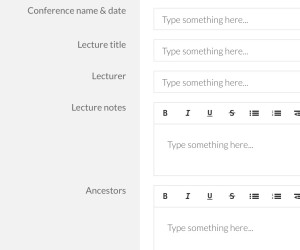
Template for taking notes at a genealogy conferenceIf you’re going to RootsTech next week (or any other genealogy conference this year) I encourage you to check out the free template I created in Transpose.
Transpose is a business platform/website that I wrote about last year. It allows you to create templates (which they now call “solutions”) to create customized forms. You can also download solutions that others have created and uploaded into the Transpose Public Library.

I’ve created a bunch of solutions for my own use and uploaded seven solutions to the Transpose Public Library. One of these is a solution called Genealogy Conference Notes. It’s designed to make it easy to take notes at a genealogy conference.

I’ve only been to one genealogy conference since I created this solution (the Genealogy Society of Southern Illinois conference last August). Using the template, I created a new record for each lecture. The template allowed me to capture general notes from the lecture and also jot down which ancestors the information might apply to, along with action ideas. It worked out really well for me–I love having a structured place to take notes. When I got home, I had a list of concrete action steps.

I chose to take notes on my laptop, because I prefer a full keyboard. Transpose has an app you can use on a tablet or smartphone, but I haven’t yet tried out taking notes with my solution on a mobile platform.

If you’re interested in trying it, you’ll need a free account at Transpose. Go to the Genealogy Conference Notes solution in the library and just copy it into your account. There it will be among any other solutions you copy or download. Just click on the solution and create a new record for each lecture you attend. All the information you capture will be saved for you in Transpose, in a searchable and filterable database.

You can also use it as a basis creating your own solution that works better for your needs. The folks at Transpose work hard to make it easy for you to use the platform. Here’s a great getting started tutorial.

I can’t wait to use it for the next genealogy conference I attend!

Unfortunately, Transpose announced on November 8, 2016 that it is shutting down on December 9, 2016.

Filed Under: Genealogy tips, Organizing, Technology Tagged With: conferences, genealogy tools, organizing aids, record keeping, research, technology

Visiting the National Archives in St. Louis

September 29, 2015 By Janine Adams 19 Comments

Here in St. Louis, we are lucky to have a branch of the National Archives, the National  Personnel Records Center (NPRC). This massive building houses military personnel records, as well as federal civilian personnel records and Selective Service records.

When I attended the National Genealogical Society’s annual meeting in St. Charles, Missouri, in May, I attended a talk by the NPRC director, Bryan McGraw, who detailed which records were available in St. Louis versus in Washington, D.C. (See this page for details on which documents are in the St. Louis holdings.) Attending that talk made me anxious to visit the St. Louis facility, if I could figure out whether I had ancestors there to research.

Then I was contacted by a friend in another states whose grandfather’s World War II military personnel records were available at the NRPC in St. Louis. She was looking to save the $70 fee to have the records photocopied and mailed to her. I offered to visit the Archival Research Room at the center and look at the records, and photocopy or photograph them for her. It was my chance to see this place in person.

I thought I’d share the experience here, because I thought it was really interesting.

So here are my Things You Should Know About Researching at the National Personnel Records Center in St. Louis:

  • You need an appointment. A  fire at the Center in 1973 destroyed many records. Some were damaged but not destroyed and those may require examination and conservation treatment by preservation staff. Before I could see these records, they had to be treated. When that was completed, I was notified they were ready and given an appointment to view them.
  • You have to go through security. When entering the Center, there’s a TSA-style x-ray machine for bags and metal detector The big difference is that at the Archives, they seem a bit more strict and attentive than at the airport. And  security officer was much more polite and respectful.
  • You’ll go through orientation. It was probably a half hour before I actually got into the research room because first I had to fill out some paperwork, talk with a helpful staff member, and watch a PowerPoint orientation. Then I was issued a Researcher Identification Card and sent in.
  • You’re limited as to what you can bring into the Research Room. You’re not allowed to bring in your own blank paper for note taking. (Pencils and blank paper are provided.) If you have pre-written paper to which you want to refer, it must be reviewed and stamped “NARA APPROVED.”  No pens or laptop cases. No purses. But they do have locked lockers, so you can store that stuff securely. (I had to go back to my locker to get my reading glasses, and that wasn’t a problem.) You can bring in laptops, cameras, mobile devices and certain scanners. See this Policies and Procedures page for more information.
  • You can take great pictures with your phone. They provide what they call “camera table mounts,” which are clear acrylic stands, like little tables, that straddle the document. You place your phone on top of the stand to elevate the phone and hold it steady so that you can shoot a photo of the document from above (through the stand). The stand made it really easy to take good photos of many of the documents. I used the photocopier for bound documents, so they could lie flat.
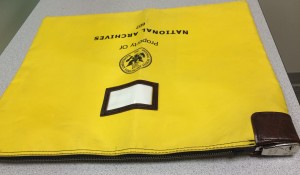
  • Security going out is stronger than going in. As a precaution against stealing, once you have paid for your photocopies, they count the documents, put them in a folder, and place them in a locked canvas bag (that’s one in the photo above), along with any papers stamped NARA APPROVED. Once you’ve gathered your things from your locker, you take the locked bag back to security, where it’s unlocked and your documents given you. There’s no way to smuggle anything out.
  • It’s free! Except for the photocopying fee (I think I spent all of $10), there was no charge, not even for parking. There is a little concession area where you can purchase food if you’re there all day.

I enjoyed my experience at the NPRC and hope that I can go back to research my own ancestors!

For information about researching at the National Archives, in Washington, D.C., see this great blog post, 5 Tips for Your First Visit to the National Archives in Washington, D.C., by genealogist D. Joshua Taylor, which details that experience. They seem similar, with some key differences.

Filed Under: Genealogy tips Tagged With: National Arhives, research, research trip, resources

Create (or download) genealogy forms with Transpose

September 15, 2015 By Janine Adams 9 Comments

I think many genealogists (including me) enjoy forms. We collect data and we like to have a place to put it. I have been playing with a website that allows me to create forms willy nilly and I’m having a great time.

That website is Transpose. It makes it ridiculously easy create forms that you can fill out yourself or share with others via weblink. (So you could create a form to send to cousins, for example, and the answers would form a database in your Transpose account.) You can also publish form templates for others to download and customize for their own use.

I learned about Transpose via Diahan Southard, Your DNA Guide, who mentioned that she used Transpose’s previous incarnation, KustomNote, for creating contact forms that help her organize the many DNA-related contacts she receives.

Since creating my (free) account on Transpose, I have created a bunch of forms, including several genealogy-related templates that I’ve been using regularly.

I’ve made three genealogy templates public:

  • Genealogy conference notes (which was really handy when I was taking notes at the Southern Illinois Genealogical Society’s conference)
  • Genealogy task list (which is wear I’m keeping track of current projects, as I blogged about last week)
  • Genealogy abstract form (which I’m using to capture data as I abstract my ancestors’ Civil War pension files)

Please feel free to download them and customize them for your use. I’m sure I’ll be adding more–they’ll all be tagged Genealogy, so they’ll be easy to find when you browse public templates at Transpose.  All my templates are quite simple, but I feel like I’ve just scratched the surface of the power of Transpose. I look forward to getting into it deeper!

Oh, and of course, Transpose has an iOS app, so I can use it on my iPhone and iPad. (An Android app is in development.)

If you use Transpose and have any public templates, please let me know in the comments!

Unfortunately, Transpose announced on November 8, 2016 that it is shutting down on December 9, 2016.

Filed Under: Genealogy tips, Organizing, Technology Tagged With: genealogy tools, organizing aids, record keeping, research, technology

  • « Go to Previous Page
  • Page 1
  • Interim pages omitted …
  • Page 29
  • Page 30
  • Page 31
  • Page 32
  • Page 33
  • Interim pages omitted …
  • Page 43
  • Go to Next Page »

about me

I'm Janine Adams, a professional organizer and a genealogy enthusiast. I love doing family history research, but I find it's very easy for me to get overwhelmed and not know where to turn next. So I'm working hard to stay organized and feel in control as I grow my family tree.

In this blog, I share my discoveries and explorations, along with my organizing challenges (and solutions). I hope by sharing what I learn along the way I'll be able to help you stay focused and have fun while you do your research, too.

tags

30 x 30 Adams amy johnson crow anniversary Brown cemetery census Civil War conferences connections dna electronic files Evernote excitement Family Curator family photos genealogy tools getting started goals How They Do It Igleheart Jeffries keepsakes learning opportunities maps newspapers NGS organizing aids overwhelm paper files planning quick tips rasco record keeping research research log research trip resources RootsTech social history source documentation Stacy Julian technology time management vital records

join the facebook community!

join the facebook community!

My organizing business

Learn more about my organizing business, Peace of Mind Organizing®.

Subscribe by RSS

  • RSS - Posts
  • RSS - Comments

© 2026 Janine Adams


Loading Comments...