• BLOG
  • ABOUT
    • Privacy Policy

Organize Your Family History

Stay focused and happy while exploring your roots

Five things I wish my early-researcher self had known

April 26, 2019 By Janine Adams 12 Comments

Earlier this year, I found a pile of papers from early days of my genealogy research and went through them to see what was of value. As I reported back, I let go of a lot of it and scanned some, and it was a worthwhile, if somewhat tedious, endeavor.

In a separate project, I’ve been evaluating the source documentation in my Reunion database. The way I cited and processed early sources was not always great, to say the least. As part of this project, I’ve been reexamining each source, which has helped me make the citation better and glean more information.

As I looked at my early research efforts, five things emerged that I wish I’d known back then.

  1. Always write down a source or copy a title page when photocopying something. In some cases, while examining the paper pile, I had no idea where the document had come from. In a couple of cases, a little searching online revealed the source. But what a waste of time.
  2. Assume you’ll remember nothing. I now keep notes in my research log because the work involved in trying to figure out why I copied or downloaded something  is another waste of time.
  3. Siblings matter. Early on, I researched only direct-line ancestors. I think it was because keeping track of collateral relatives felt overwhelming. I know better now. Keeping track of siblings (and cousins!) helps you evaluate information and provides critical clues.
  4. Indexes are clues, not sources. Some of the early sources in my Reunion database are indexes. Now, I don’t include an index as a source unless I’ve absolutely exhausted the possibilities for finding the actual document that was indexed. There is so much more information available in the actual document than the index itself. And, of course, indexes, which were created after the fact, are almost by definition less reliable than original sources.
  5. Be really critical. Early on, finding anything that seemed to support an idea I already had felt like a big win and I didn’t necessary examine it critically. But I’ve learned to critically evaluate every bit of evidence. I don’t automatically accept documents that support my hypotheses, nor do I reject evidence that does not. I like to think of it as sources earning their way into my database.

Genealogy is a process of constant learning. We all make mistakes at the beginning and with any luck we learn from them. (I’m still making mistakes and still learning.) Perhaps this short list will help someone avoid a couple of mistakes.

How about you? What do you wish your early-genealogist self had known?
Filed Under: Challenges, Genealogy tips, Reflections Tagged With: record keeping, research, source documentation, time management

Getting started again after a hiatus

March 22, 2019 By Janine Adams 3 Comments

One of the things I love about doing daily genealogy research is that I never lose the thread of my research. I jot down next steps in my research log and then each morning I know just what to work on. No agonizing over what to research.

That’s how it’s supposed to work and how it does work when I’m in my groove. But, as I mentioned in a post earlier this week, I’ve done virtually no research for about a month. None. It makes me sad and it’s why I’m starting a 30 x 30 challenge on April 1.

Today I had a sliver of time and some motivation to get back in the saddle. But I faced a conundrum about what to work on. Most recently, I’d been working on eradicating the paper backlog I uncovered. But I’m away from home at the moment so I physically couldn’t do that.

It’s amazing to my how paralyzing the question, “What should I work on?” is. It can stop me in my tracks.

So I started thinking about the various strategies I could employ in figuring out what to work on today:

  • I could look at my research log to see where I left off.
  • I could work on processing my backlog of downloaded documents. (A small one has built up in recent months.)
  • I could open up my Source Documentation Checklist and pick up where I left off.
  • I could look at my follow-up notes, which I keep in notebooks by surname in Evernote.
  • I could choose an ancestor (any ancestor) and see what research questions I have about him/her and get started there.
  • I could look in my family-tree software (I use Reunion) and see if any of my families had a significant event today and work on them. (I wrote about that method here.)
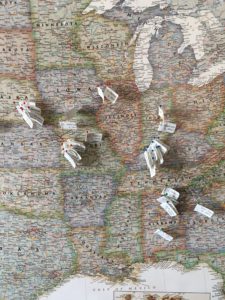
  • If I were at home, I could play pin-the-tail-on-the-donkey and close my eyes and grab a pin on my ancestor map, then do some research on that ancestor. (That’s my ancestor map in the photo.)

Here’s the thing: it doesn’t really matter what I start working on as long as I re-engage with my research. The important thing is that I get the ball rolling and work on something. (Anything, really.) As my co-host Shannon Wilkinson and I discuss on our podcast Getting to Good Enough, perfectionism can really get in the way of doing what you love!

What I ended up doing was working on my backlog of downloaded documents, which allowed me to jump right in and make progress. It felt great!

Filed Under: Challenges, Genealogy tips, Organizing Tagged With: record keeping, source documentation, time management

Organizing your family history research with Zotero

February 23, 2019 By Janine Adams 11 Comments

I interviewed the author of this guest post, Donna Cox Baker, in my How They Do It series last year. In it, she mentioned she used Zotero, which I had not been familiar with, to organize her genealogy research. I asked her to write a guest post about Zotero and here it is! I haven’t checked out Zotero yet, but I very much appreciate reading Donna’s perspective as a Zotero power user. For more information, check out Donna’s book, Zotero for Genealogy.

I want to thank Janine for offering me the chance to expand on the wonders of Zotero. It is the core of my genealogical research, as it once was in my doctoral research.
With thousands of resources to cite in my doctoral research, Zotero sold me the minute I experienced the “Zotero Connector” add-on. The connector is an extension for web browsers that allows you to click a single button and extract citation data from any number of places it appears, even Amazon. The citation for virtually anything that appears in a library catalog online can be stored in your Zotero database in less than a second.

Through another extension, Zotero can be linked to Microsoft Word. You can create your footnotes and bibliography straight from Zotero, letting it format the citation.

Discovering Zotero for genealogy

Well, that was graduate school. Within minutes of finishing the dissertation, I had pulled out my long-neglected genealogy box, and got back to the thing that first made me care about history.

Our family tree solutions—like Family Tree Maker, Ancestry.com, Legacy, RootMagic, MyHeritage, and so forth—give us adequate ways to document individual facts. We add a birthdate to an ancestor’s profile and cite the source. But research—what I call Big-R Research—starts way before the individual facts and goes much bigger than an isolated birthdate.

Genealogists have file cabinets full of Big-R Research, if we’re doing true family history, and not just filling in the blanks on a chart. We want to know about where our people lived and how they lived. We want road maps of their communities and the minutes kept at their church’s business meetings. We want photographs and letters and court transcripts that fill in the story. Our research can fill a room.

It doesn’t have to fill a room, though. It can take up gigabytes, instead. But we need a tool to store and retrieve it. My search for a proper Big-R Research tool began.

I tried OneNote, then Evernote, but I continued to feel a nervous sense of distrust. Would the structure hold together? Was it portable to other tools?

Then it hit me. I already had the tool I needed. It was tried and sure. It was both structured and flexible, controlled but expansive. Zotero would be great for genealogy!

Before I get into the reasons it is great, let me be transparent in this: it was not made for genealogy or by genealogists. I’ve developed tweaks here and there to deal with the differences between history and genealogy. You will not dump perfectly formatted Evidence Explained citations from Zotero (or most other tools I’ve tried). But you can come pretty close. And I’m working on some technical tweaks that will get us even closer.

Why Zotero matters

Zotero is great for genealogy for all of these reasons and more:

  • It is free, with the stability and support of a university backing it up. Even if you are syncing to the Zotero cloud, you can do that for years on free storage, before you have to buy some. And when you do buy storage, it’s inexpensive and unlimited.
  • It provides the structure missing from tools like OneNote and EverNote, but brings substantial flexibility, along with the structure.
  • It can add most catalogued online source citations to your Zotero library with one click.
  • It can organize and provide one-click access to the thousands of documents, spreadsheets, photographs, and other files you have saved to your hard drive. In essence, it can draw all those files together into a uniform, organized system. Zotero becomes your door to all you have collected.
  • It allows you to create a record once but to file it in as many folders as you want without taking up significant extra space. You make a change once, and it changes in every folder.
  • You can find things rapidly, even if you only have vague memories of having long ago found a document that might be of use in solving a new genealogical problem.
  • It will sync to the cloud, allowing you to access your work at Zotero.org, wherever you have Wifi access.
  • It can replace your to-do list and your research log with something more efficient and always accessible.
  • It allows you to set up group arrangements, so multiple people can collaborate together on a research collection.
  • It can import from and export to a number of other bibliographic managers or databases, making it portable and survivable in a changing world.
  • And while you are in Zotero every day anyway, why not store personal things there? How about storing recipes, your journal, articles about financial management in retirement. It can be your photo album. It can even store every article coming out of an RSS feed you have subscribed to.

Giving it a try

Since Zotero is free, you can try it with no risk. In fact, I encourage you to take up the challenge I offered to the readers of The Golden Egg Genealogist blog not long ago. I asked them to test out the one feature that sold me utterly and forever on Zotero: its ability to grab citations from online sources like Amazon and your local library catalog. Here’s the article: Instant citations: Zotero’s magic bullet.

I’ve also set up an online discussion forum at the Zotero for Genealogy website. It is growing fast, and we are teaching each other how to handle citations and research organization with maximum efficiency. Join us there for free.

If you want guidance in the use of Zotero, I have written the book I wish someone had given me ten years ago, as I struggled to organize my history research for school. It’s called Zotero for Genealogy: Harnessing the Power of Your Research and debuted in January 2019 as Amazon’s “#1 New Release in Genealogy.” You can find it on Amazon or at my online store. In fact, there is a free excerpt of the book there, if you want to check it out.

I hope to see the field of genealogy moving to Zotero in large numbers. Give it a try!

Filed Under: Challenges, Genealogy tips, Organizing, Technology Tagged With: Donna Cox Baker, genealogy tools, organizing aids, record keeping, research log, resources, source documentation, technology, Zotero

Discussing digital files on Genealogy Happy Hour

February 15, 2019 By Janine Adams 2 Comments

I’m a guest on the most recent episode of Genealogy Happy Hour, published today. I had a great time talking with with hosts Amy Gabrill Lay and Penny Burke Bonawitz about organizing digital files in genealogy research (a favorite topic of mine!).

Genealogy Happy Hour is a fun monthly “genealogy podcast with two blondes and a bottle,” to quote its tagline. It’s mostly about genealogy and a little bit about wine. These are two of my favorite things to talk about (and participate in), so I jumped at the chance to talk with these fun folks when they invited me!

You can listen to Episode 38 here. I hope you enjoy listening to it as much as I enjoyed doing it!

Filed Under: Excitement, Genealogy tips Tagged With: electronic files, genealogy happy hour, podcasts, record keeping, technology

  • « Go to Previous Page
  • Page 1
  • Interim pages omitted …
  • Page 3
  • Page 4
  • Page 5
  • Page 6
  • Page 7
  • Interim pages omitted …
  • Page 15
  • Go to Next Page »

about me

I'm Janine Adams, a professional organizer and a genealogy enthusiast. I love doing family history research, but I find it's very easy for me to get overwhelmed and not know where to turn next. So I'm working hard to stay organized and feel in control as I grow my family tree.

In this blog, I share my discoveries and explorations, along with my organizing challenges (and solutions). I hope by sharing what I learn along the way I'll be able to help you stay focused and have fun while you do your research, too.

tags

30 x 30 Adams amy johnson crow anniversary Brown cemetery census Civil War conferences connections dna electronic files Evernote excitement Family Curator family photos genealogy tools getting started goals How They Do It Igleheart Jeffries keepsakes learning opportunities maps newspapers NGS organizing aids overwhelm paper files planning quick tips rasco record keeping research research log research trip resources RootsTech social history source documentation Stacy Julian technology time management vital records

join the facebook community!

join the facebook community!

My organizing business

Learn more about my organizing business, Peace of Mind Organizing®.

Subscribe by RSS

  • RSS - Posts
  • RSS - Comments

© 2026 Janine Adams


Loading Comments...